
Validate and Clean Email Addresses in a CSV
How to clean and validate email addresses in a CSV: trimming, mailto: and name wrappers, lower-casing, the syntax check, and the list of invalid addresses with line numbers.
A contact list for a mailing needs email addresses that are well formed and written in one way, and it needs a list of the entries that are not valid. To check the emails of a CSV, load the file into the CSV Phone, Email & Name Standardizer, give the right column the email rule and read the result. The cleaned addresses go into the file, and the bad ones are listed separately.
What is cleaned
The email rule fixes the usual problems of addresses that were typed, copied or exported from other systems:
- Spaces around the address are removed.
- A mailto: prefix, left over from a link, is removed.
- A name wrapper such as Ada Lovelace ada@example.com is reduced to the address inside the angle brackets.
- The address is lower-cased.
For example, Ada.Lovelace@Example.COM becomes ada.lovelace@example.com.
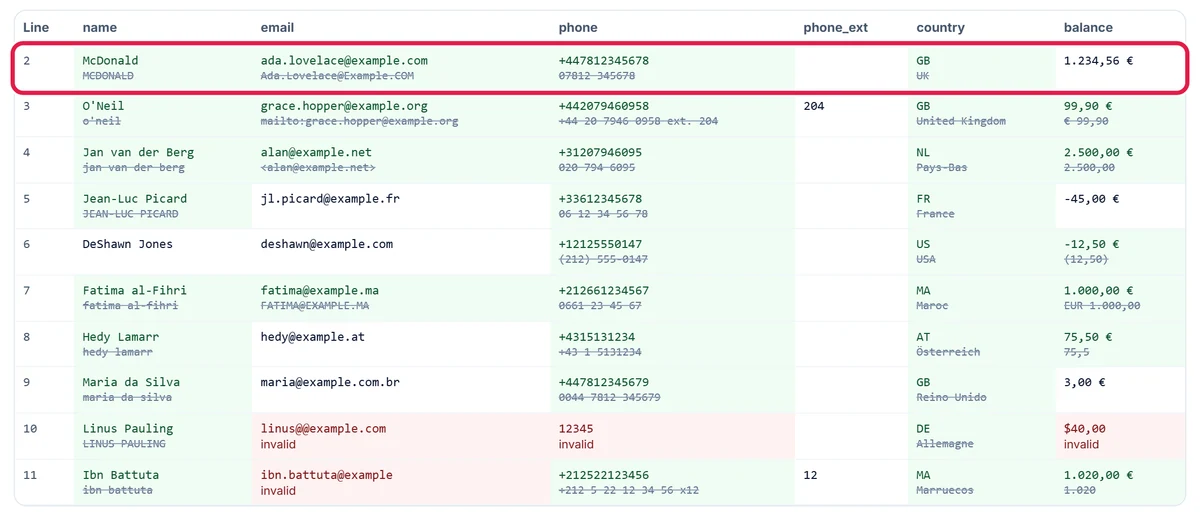
Lower-casing gives one form for every address, which makes duplicates visible. Ada.Lovelace@Example.COM and ada.lovelace@example.com are the same mailbox in practice, because mail providers treat addresses as case-insensitive, but a list that holds both counts two contacts. After the cleaning, the two entries are equal, and a duplicate removal catches them. See Remove Duplicate Rows From a CSV File for that step.
What is checked and what is not
The tool checks the syntax of each address: one @, a local part of at most 64 characters, a domain with a dot and a valid ending such as .com, and no characters that cannot be there. The syntax of addresses is defined in RFC 5322.
The tool does not contact any mailbox. A syntax check cannot tell whether the address exists, whether the domain accepts mail or whether the mailbox is full. A valid address can still bounce. The check removes the obvious errors, such as typos in the structure, and it does not replace the feedback you get from sending.
For a marketing list, use both. Clean the list with the standardizer first, so that you do not send to malformed addresses, and then watch the bounces of the first mailing. Remove addresses that bounce, and respect the unsubscribe requests of your recipients.
Steps
- Open the CSV Phone, Email & Name Standardizer.
- Paste the CSV or open the file.
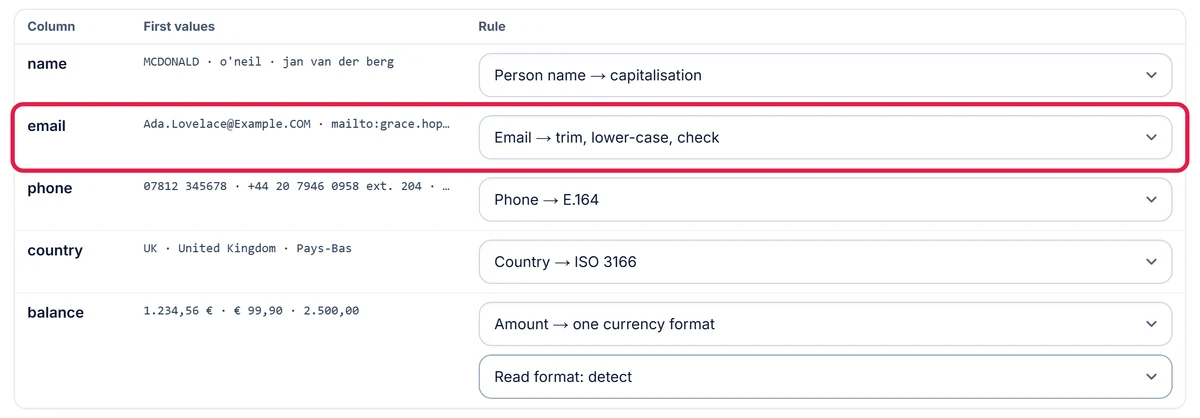
- Under Rule for each column, check that the email column has the rule Email → trim, lower-case, check. The tool suggests it from the column name and the values.
- Check the Before and after preview of the cleaned addresses.
- Read the table of invalid or unfixable values.
- Press Download standardized CSV.
If your file has several email columns, such as a work and a private address, set the rule on each of them. A column that is not set is left as it is.
The same screen handles phone numbers and names. For phone numbers, see Standardize Phone Numbers to E.164 in a CSV, and for names, Fix Name Capitalization in a CSV Contact List.
The invalid values list
Values that are not valid addresses are not changed and not deleted. They are listed with their line number, so you can find each one in the source file. Nothing is dropped silently.
Two typical examples in the sample data are linus@@example.com, which has a doubled @, and ibn.battuta@example, which has a domain without a top-level part.
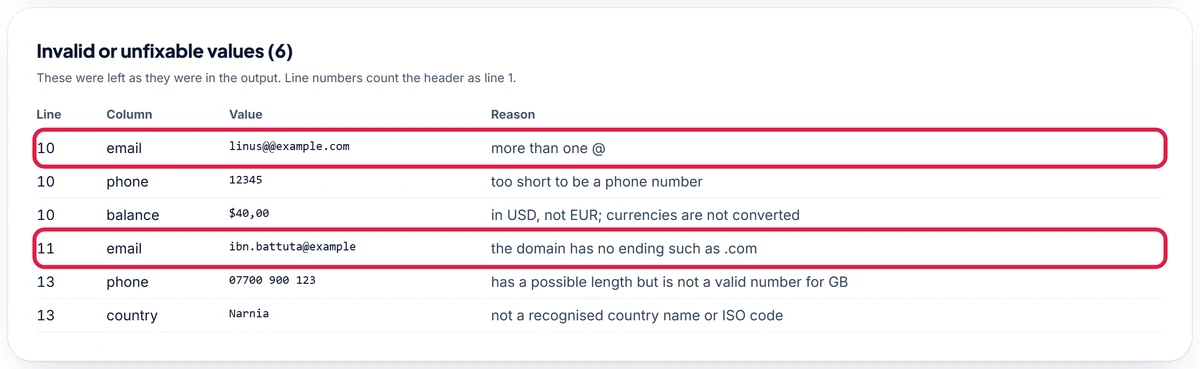
Go through the list and decide for each entry. A typo such as a doubled @ can be corrected in the source. An address without a real domain, such as example, may be incomplete, and you may be able to find the correct one from another record. Entries that cannot be fixed should stay out of the mailing.
Because the line number is given, you can fix the original file and run the standardizer again. Keep the original file untouched, and work on a copy.
If the addresses are not in a column but in a block of free text, such as an email thread or a web page, first pull them out. Extract Email Addresses From Text and Remove Duplicates shows how with the Text Data Extractor.
Try it
Open the CSV Phone, Email & Name Standardizer, load your list and set the email rule on the address column. Check a few cleaned rows, go through the list of invalid values by line number, and download the cleaned file.