
Create a PostgreSQL Table From a CSV With Types
How the CSV to SQL generator writes a PostgreSQL CREATE TABLE: type detection, snake case column names, dates that stay text and the limits of each dialect.
Loading a CSV into PostgreSQL starts with a table, and writing the CREATE TABLE statement by hand means deciding a type for every column. The CSV to SQL INSERT Generator detects the types from your data and writes the CREATE TABLE for PostgreSQL, together with the INSERT statements. This guide explains how the types are chosen, how names are cleaned and what the dialect limits are.
How types are detected
The generator looks at the values of each column, in the first 10,000 rows, and picks the narrowest type that fits all of them. The types it can choose are:
- integer
- big integer, for whole numbers that do not fit in an integer
- decimal, for numbers with a fraction
- boolean
- date, for values in the form YYYY-MM-DD
- timestamp, for dates with a time
- text, for anything else
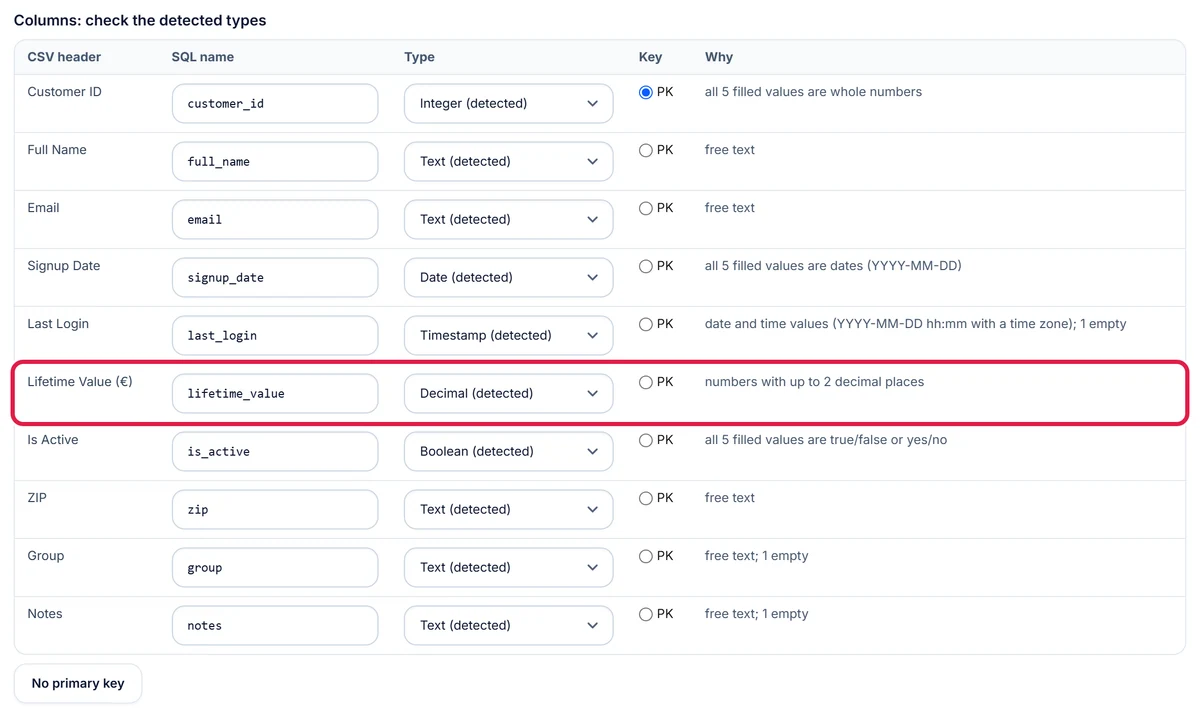
A column of whole numbers such as 1, 2 and 3 becomes an integer, a column with 12.50 becomes a decimal, and a column of true and false becomes a boolean. If one value in a column does not fit the type, the column falls back to text. The column Why in the table of columns gives the reason for every type, for example "all 5 filled values are whole numbers".
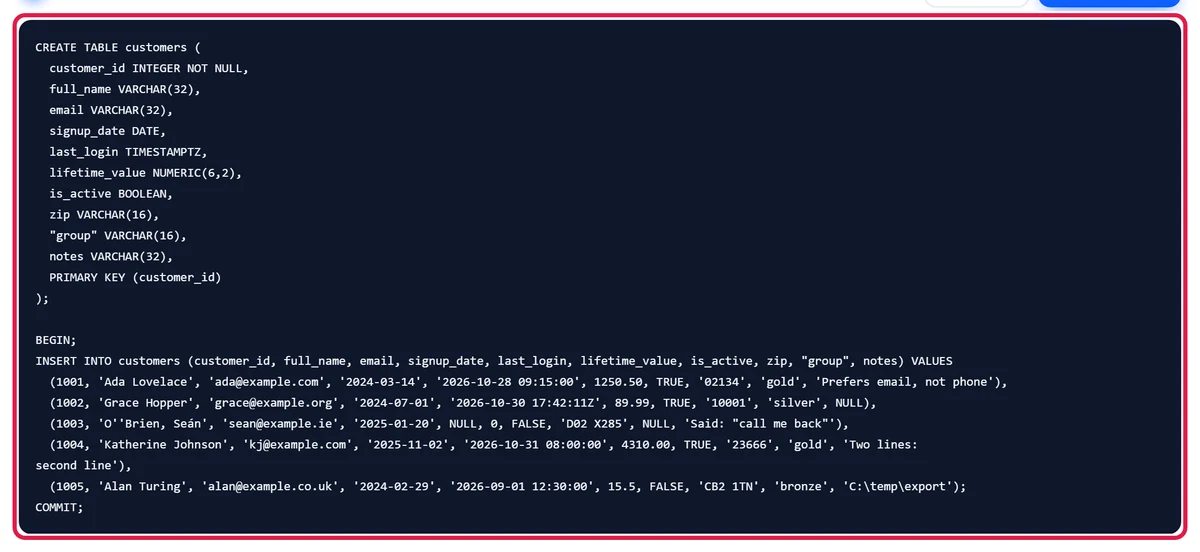
The type matters for what you can do later. A number stored as text cannot be summed or compared as a number, and a date stored as text does not sort or filter as a date. On the other hand, identifiers such as zip codes must stay text, so that a leading zero is not lost. In the example, the zip column is a text type, VARCHAR(16), and a column named group is quoted, because group is a reserved word in SQL. Text columns are written as VARCHAR with a size rounded up to 16, 32, 64, 128, 255, 1000 or 4000, and as TEXT for longer values.
The types are described in the PostgreSQL documentation on data types, and the statement itself in CREATE TABLE. Read the generated column list before you run anything, and change a type if you know better than the data.
Column names cleaned to snake case
Spreadsheet headers are written for people: they contain spaces, capital letters, brackets and symbols. Such names are awkward in a database, because they need quotation marks everywhere. The generator turns them into plain snake case names.
- Lifetime Value (€) becomes lifetime_value.
- Größe becomes grosse.
Spaces become underscores, capital letters become small letters, symbols such as € and the brackets are removed, and letters with special forms are written in plain letters, as in ß to ss. Check the new names in the column list. The generator makes the names unique by adding _2, 3 and so on, so email and Email become email and email_2, and a name that would start with a digit gets the prefix c.
PostgreSQL limits the length of a name to 63 characters. A longer header is cut at that limit, so give very long headers a shorter name in the source if the cut would make two names equal.
Dates that stay text
A date is recognised as a date type only in the form YYYY-MM-DD. A value such as 28/10/2026 is not converted. The column stays text, because the order of day and month in such a format is ambiguous, and a wrong guess would put wrong dates into the database.
If you want real dates, standardize the column first. The guide Standardize Dates in a CSV: Day-First or Month-First shows how to convert all dates to the ISO form, and then the generator detects them as dates.
Do this before loading, not after. Changing a text column to a date column later is possible, but it needs a conversion in SQL and fails when one value is not a valid date.
Dialect limits
The generator writes for several databases, and each has its own limits. For PostgreSQL, the main limit is the length of names, as above.
SQL Server accepts at most 1,000 rows in a single INSERT statement. The field Rows per INSERT accepts 1 to 1,000, so the script stays within that limit for every dialect.

Choose the dialect before you generate the script. The types, the quoting of reserved words and the batch limits depend on it, and a script written for one dialect can fail in another. The same generator writes MySQL / MariaDB, SQLite and SQL Server scripts, each with its own quoting rules.
The tool does not connect to a database. It writes the script, and you run it. Try it on a test database first, and check the number of rows afterwards against the CSV.
Try it
Open the CSV to SQL INSERT Generator, load your CSV and choose PostgreSQL. Read the column names and types, change any type that is wrong, and run the script on a test database.