
Fix a Redirect Loop: Find the Hop That Points Back
Redirect loop checker: how a loop of two redirect rules closes, how to read the hop that points back, and how to make one URL answer 200 to fix 'too many redirects'.
A page that shows "too many redirects" is caught in a loop: URL A redirects to B, and B redirects back to A, so the browser goes back and forth until it gives up. A redirect loop checker shows which hop closes the circle. The Redirect Chain Checker follows the chain, stops as soon as a URL comes up twice, and tells you which hop points back.
What a redirect loop is
A redirect is an answer from a server that says "the page you asked for is at another address". The browser then asks for that address. If the second address answers with a redirect to the first, the browser never reaches a page.
Browsers stop after a limit and show an error. In Chrome the error is called ERR_TOO_MANY_REDIRECTS. Other browsers have their own wording, and a crawler simply gives up, which means that the page cannot be indexed.
A loop is nearly always caused by two rules that do not know about each other. Each rule is reasonable alone. Together, they send a request round in a circle. To fix it, you have to find the two rules, and that is easier when you can see the exact hops.
The difference between the codes in the chain, for example 301 and 302, is explained in 301 vs 302 vs 307 vs 308 Redirects Compared.
Worked example: /sale and /sale/
Take a shop at shop.example.com. The page /sale has a trailing slash version, /sale/. Two rules exist:
- A rule says: the address /sale is redirected with a 302 to /sale/.
- Another rule says: the address /sale/ is redirected with a 301 back to /sale.
Each rule tries to make the address uniform, but they want opposite forms. A request for /sale goes to /sale/, and from there back to /sale, and again.
When you check https://shop.example.com/sale in the checker, it follows the first redirect to /sale/. At the second hop, the server redirects back to /sale, which was already visited. The checker stops before it asks for /sale again and reports the loop. I do not run a looping shop, so the screenshots of this guide show the real page of the tool with its real analysis of this setup, with the two answers of the shop simulated. The tool's own test set uses the same two rules. I do not run a looping shop, so the screenshots of this guide show the real page of the tool with its real analysis of this setup, with the two answers of the shop simulated. The tool's own test set uses the same two rules.
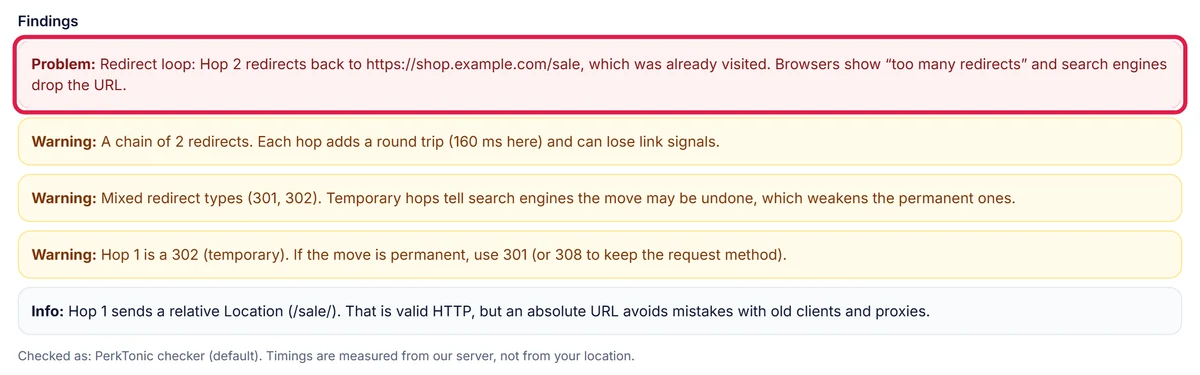
The message names the hop and the address: "Redirect loop: Hop 2 redirects back to https://shop.example.com/sale, which was already visited. Browsers show “too many redirects” and search engines drop the URL." The list of hops ends with a line that starts with "Stopped:" and says the same thing. This tells you where the circle closes, and which rule sends the request back.
Read where the loop closes
The list of hops shows each step with its status code and its target.
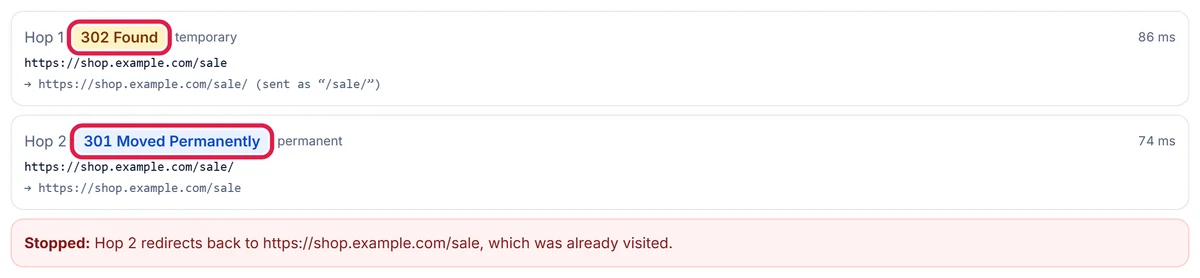
In the example, hop 1 is a 302 from /sale to /sale/, with a relative Location, and hop 2 is a 301 from /sale/ back to /sale. Look at the pair of codes. A temporary redirect in one direction and a permanent one in the other is a hint that two different pieces of software made the rules: one rule in the application and one in the web server, or one in the CDN. When two systems both normalise the address, they need to agree on the form.
Note which system sends each hop. The response headers can help: a header such as Server or a header that names a CDN or a framework shows who answered. The HTTP Response Header Analyzer reads the headers of a response.
Fix: make one URL answer 200
The fix is to decide which form of the address is the real one, and let that address answer with the page, status 200, without a redirect. The other form redirects to it, once.
The recommendation at the top of the result says: "Fix the loop: make one of the URLs answer 200 instead of redirecting again."

For the example, if you prefer the slash form, /sale/ must answer 200, and the rule that sends /sale/ back to /sale has to go. If you prefer the form without a slash, remove the rule that sends /sale to /sale/. Pick one form, and use it in internal links, in the sitemap and in canonical tags, so that all signals agree.
After the change, check again. The result should be one redirect at most from the other form, and a 200 at the end. For a chain that works but has too many hops, see Check a Redirect Chain and Collapse It to One 301. The status codes are described by MDN in the page about redirections in HTTP.
Common causes
A trailing slash is only one of the sources of loops. The usual ones are:
- Two systems normalise the slash differently, as in the example: the application and the web server, or the server and a plugin.
- HTTPS and HTTP rules that conflict. A server forces https, while a proxy or CDN in front of it contacts the server over http, so the server redirects every request again. The checker reports a redirect from HTTPS back to HTTP as a problem in its own right, because it downgrades the secure connection and often belongs to such a loop.
- www and non-www rules that point at each other, for example one in the DNS provider and one on the server.
- A site address setting in a CMS that differs from the address in the server rules.
- Login or language redirects that depend on cookies. The checker does not send your cookies, so a loop that only appears for a logged-in browser may not show up. Test with the browser, and clear the cookies of the site.
Look for the rules in every layer that can redirect: the application, the web server, the CDN and the hosting panel.
Try it
Open the Redirect Chain Checker, enter the address that shows the error and press Check redirects. Read the message about the loop, look at the status codes of the hops, remove one of the two conflicting rules so that one address answers 200, and run the check again.