
Check When an SSL Certificate Expires
SSL certificate expiry checker: the days left, the verdict, the warnings at 30, 14 and 7 days, what to do when it has expired, and how to read the chain and the TLS versions.

An expired certificate makes browsers show a full-page warning, and visitors leave. To check SSL certificate expiry, enter the domain in the SSL Certificate Checker. It shows the date on which the certificate expires, the number of days left and a verdict on the health of the certificate, and it also looks at the certificate chain and at the TLS versions that the server accepts.
Steps: domain, port, Check
- Open the SSL Certificate Checker.
- Enter the domain, for example shop.example.com.
- Check the port. The default is 443, the port of HTTPS. Change it for a mail server or another service that uses TLS on a different port.
- Press Check.
The checker connects to the server five times. One connection reads the certificate. The other four test the TLS versions, one connection for each of TLS 1.0, 1.1, 1.2 and 1.3, to see which versions the server accepts. You can run 15 checks every 10 minutes, which is enough to go through the domains of a small company, and more than that needs a pause.
Use the domain name that visitors use. A certificate belongs to names, and the name that you test must be among them. If it is not, the problem is a name mismatch, as described in Certificate Name Mismatch: www vs Bare Domain.
Read the verdict and countdown
The result opens with a countdown: a large number with the words DAYS LEFT, followed by one sentence that states the verdict. Below it is a list of checks, each marked OK, Warning or Problem. The countdown gives the number of days until the certificate expires; for an expired certificate it counts the days since the expiry instead.
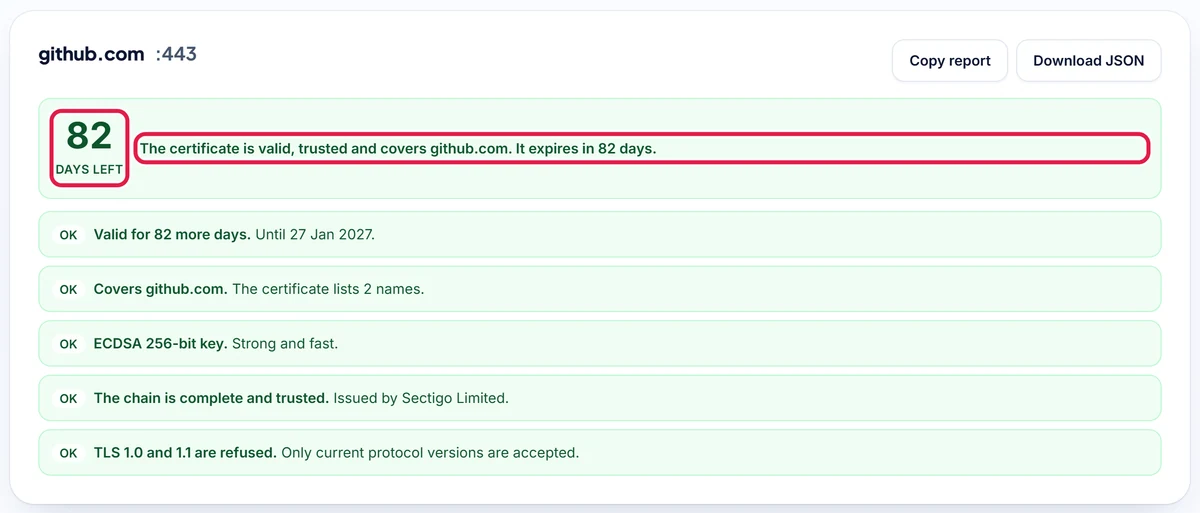
On 6 November 2026, github.com had 82 days left, and the verdict read: "The certificate is valid, trusted and covers github.com. It expires in 82 days." The checks below say that the certificate is valid until 27 Jan 2027, that it covers github.com, that the key is ECDSA 256-bit and that the chain is complete and trusted, issued by Sectigo Limited. The details of each certificate, with its names, issuer and dates, are in the Certificate chain section.
Look at the length of the validity. A certificate whose validity is longer than 398 days is pointed out. The lifetime of publicly trusted certificates is limited by the browsers, and a longer one may be rejected or flagged. Short lifetimes are normal today, and automatic renewal is the usual way to handle them. The Let's Encrypt FAQ explains the lifetime of its certificates and why it is short.
Expiry warnings at 30, 14 and 7 days
The checker warns before the certificate expires. A warning begins when 30 days are left, with the advice that automatic renewal usually happens around now and that you should make sure it does. At 14 days or fewer the advice is to renew it this week, and at 7 days or fewer the check becomes a Problem: renew it today and check that automatic renewal is working.
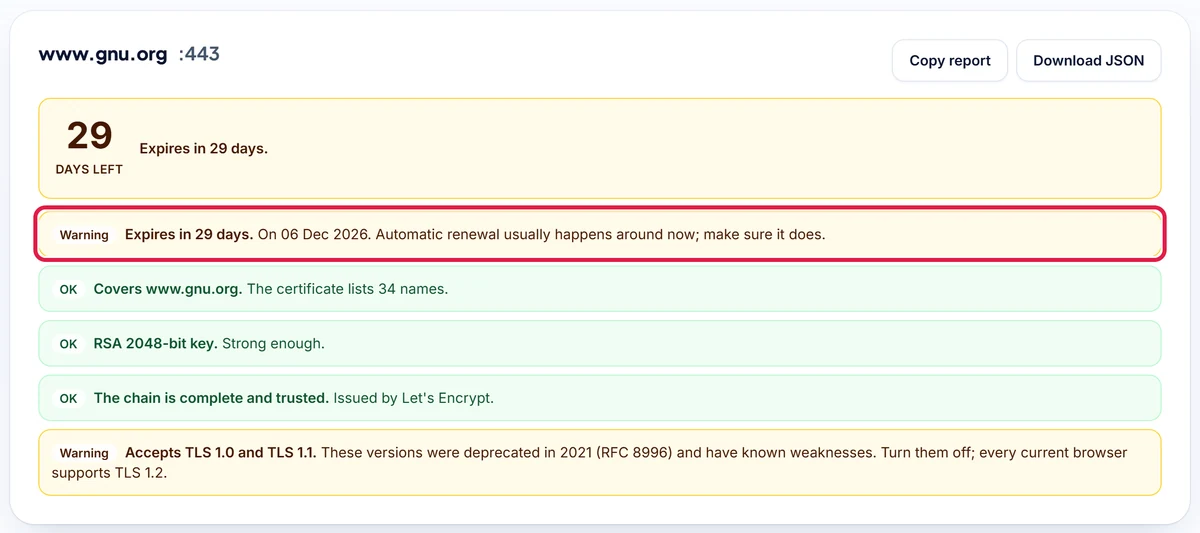
On 6 November 2026, www.gnu.org had a certificate from Let's Encrypt with 29 days left. The check reads: "Expires in 29 days. On 06 Dec 2026. Automatic renewal usually happens around now; make sure it does."
Why 30 days? Renewal is rarely instant. It may need a person to approve, a change in a hosting panel or a restart of a service, and the process can fail the first time. A month leaves room to find and fix a problem. If a certificate is meant to renew automatically and has reached 30 days or fewer, the automation is probably broken, and you should look at it now and not on the last day.
Put the expiry date of every certificate in a calendar, or use a monitoring service. For other regular tasks that should not be missed, see how to watch a job in Monitor a Cron Job With a Heartbeat URL.
An expired certificate
If the certificate has expired, the checker says so, and it gives the number of days since the expiry. For expired.badssl.com, a test site that keeps an expired certificate on purpose, the countdown reads 4226 DAYS SINCE EXPIRY and the Problem says: "Expired 4226 days ago. The certificate ended on 12 Apr 2015. Renew it now."
An expired certificate has to be replaced. Renew it with your certificate provider or fix the automatic renewal, install the new certificate and restart or reload the service. Then run the check again. The countdown should show a new, full period, and the verdict should be healthy.
Check also whether the new certificate was installed on all the servers that answer for the domain. A site behind several servers or a load balancer can show the old certificate on one of them, so run the check several times, or check each address. The DNS Lookup & Domain Info tool lists the addresses of the domain.
The chain and TLS versions
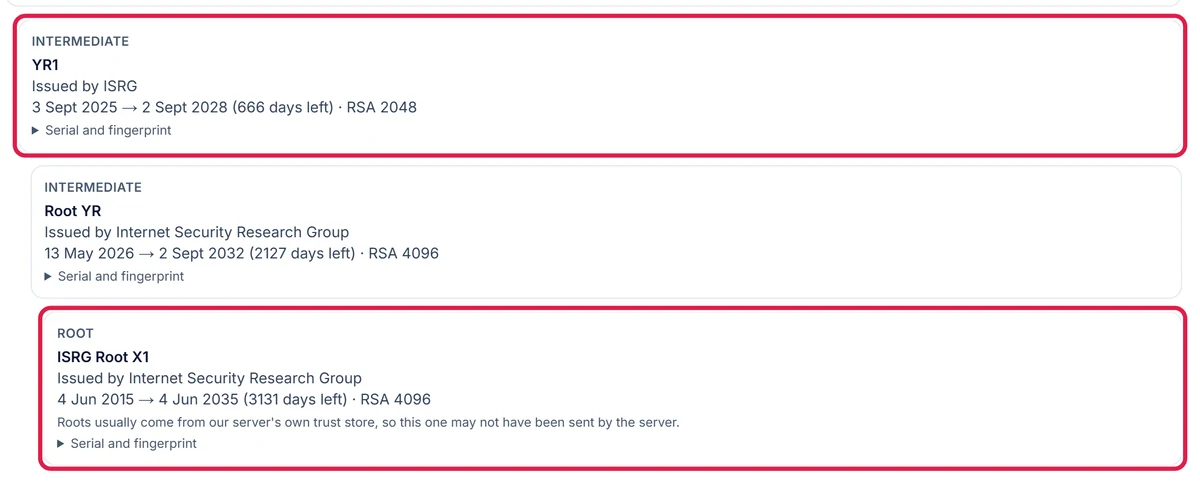
A certificate is trusted because it is signed by an issuer, which is signed by another, up to a root that browsers know. The server must send the intermediate certificates. For www.gnu.org the chain is the server certificate, then the Let's Encrypt intermediates YR1 and Root YR, and then the root ISRG Root X1. The tool notes that roots usually come from the trust store of its own server, so a root may not have been sent by the server.
A missing intermediate certificate gives errors in some clients and not in others, which makes it hard to see. The guide Fix an Incomplete Certificate Chain describes it.
The test of the TLS versions shows which ones the server accepts. TLS 1.2 and 1.3 are the versions to support. www.gnu.org still accepts TLS 1.0 and TLS 1.1, and the checker marks it as a Warning: these versions were deprecated in 2021 (RFC 8996). TLS 1.0 and 1.1 are old and should be turned off, see Server Accepts TLS 1.0 and 1.1: Turn Them Off. For the security headers of the same site, the HTTP Response Header Analyzer is the next tool.
Try it
Open the SSL Certificate Checker, enter your domain and press Check. Read the days left and the verdict, note any warning at 30, 14 or 7 days, look at the chain, and put the expiry date in a calendar.