
Regex for Email Addresses: Test a Library Pattern
How to use the library email regex of the Regex Tester: pick the pattern, test it on real text, see what it accepts and rejects, and when an extractor is the better tool.

Writing a regex for email addresses from scratch is a classic way to waste an afternoon, because the full rules for addresses are complicated and a short pattern can only cover the common cases. The Regex Tester & Generator has a library of 23 ready patterns, including one for email addresses. You pick it, test it on your own text and see what it accepts and rejects before you use it in code.
Pick the pattern from the library
Open the Regex Tester & Generator and press Pattern library (23). It holds 23 patterns for common tasks, each with a name, the pattern and a short description, and a search box that finds "email", "date" or "phone". Choose Email address, and the pattern, its flags and a sample text are loaded into the tester.
The library pattern for this job is:
[\w.+-]+@[\w-]+(?:\.[\w-]+)*\.[A-Za-z]{2,}
It reads: one or more word characters, dots, plus signs or hyphens for the local part, an @, then a domain made of word characters and hyphens with any number of further parts separated by dots, a dot, and a top-level part of at least two letters. The panel What the pattern means under the tester explains it piece by piece.
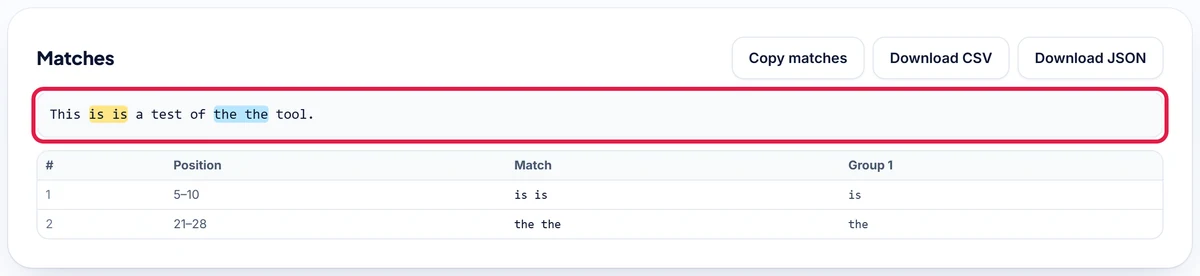
The library has patterns for other tasks as well. One finds repeated words, such as the typo "the the". It is \b(\w+)\s+\1\b: a whole word, white space, and then the same word again. The \1 is a backreference that means "the same text that group 1 matched". With the flags g and i, it finds is is and the the in the sentence "This is is a test of the the tool".
Test it on real text
A pattern is only as good as the text you try it on. Paste a realistic sample into the tester: a few lines from your data, with addresses in the middle of sentences, in lists and in signatures.
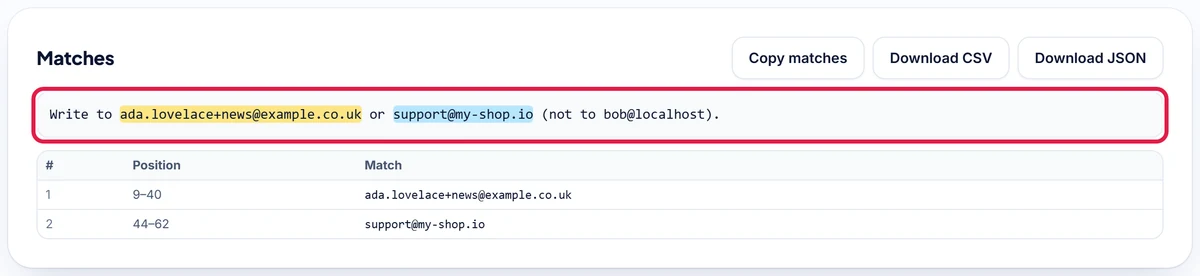
Check the matches in the list. Each address that you expect should be highlighted whole, from the first character of the local part to the last character of the domain. Look at the edges. A full stop at the end of a sentence, as in "write to ada@example.com.", must not be part of the match, and a comma or a bracket next to an address must not either.
Then paste addresses that you know are wrong, such as linus@@example.com and ibn.battuta@example, and look at what happens. The answer tells you what the pattern really guarantees.
What the pattern accepts and rejects
A pattern of this kind is a shape check. It accepts text that looks like an address: something, an @, a domain with a dot. It rejects a doubled @ and a domain without a dot and a top-level part.
It does not accept everything that is formally allowed. The rules for addresses are defined in RFC 5322, and they allow quoted local parts, comments and other forms that no practical pattern supports. A pattern that tried to cover all of them would be long and slow. For real use, the shape check is the right trade.
It also accepts some things that are not real addresses. A domain such as example.invalid passes the shape check, and so does an address at a domain that does not exist. A match tells you that the text looks like an address, not that it works. For mail you only learn by sending. The CSV tool for this task, the CSV Phone, Email & Name Standardizer, also checks syntax only, and it contacts no mailbox. A valid address can still bounce.
If you use the pattern for validation in a form, keep it simple and send a confirmation email. If the pattern rejects a real address of a user, that is worse than accepting a wrong one.
The syntax of regular expressions is explained on MDN in the guide to regular expressions. To see the groups of a pattern, see Test a Regex Online With Named Groups on Log Lines.
When to use an extractor instead
If your goal is only a list of the addresses in a text, you do not need a pattern at all. The Text Data Extractor finds the addresses, puts them in standard form, counts duplicates and lets you download the list.
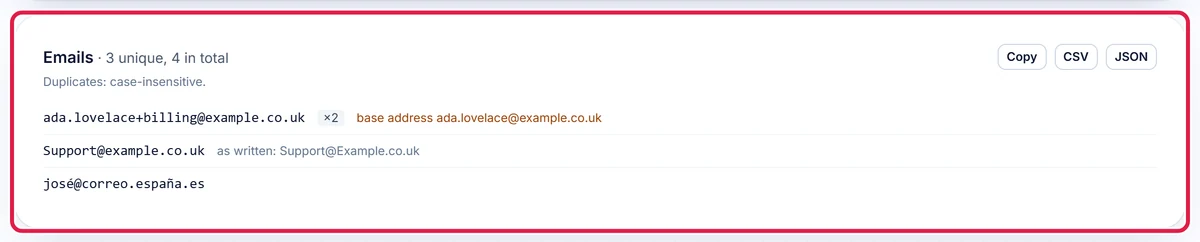
Use a pattern when you need the matching in your own code: a validation in a form, a search in a log, a replacement in a file. Use the extractor when you need the result: a clean list from a long thread, as in Extract Email Addresses From Text and Remove Duplicates. And for a table of contacts, use the standardizer, as described in Validate and Clean Email Addresses in a CSV.
Try it
Open the Regex Tester & Generator, choose the email pattern from the library and paste a sample of your own text. Check that every address is matched whole, add a few wrong addresses to see what is rejected, and then copy the pattern into your code.