
Cron Runs on the Wrong Days: Day-of-Month OR Day-of-Week
Why a cron job runs more often than expected when both day fields are set, how Sunday is numbered in each dialect, and how to schedule the first Monday of the month.

A cron job that was meant to run once a month runs far more often, and the cause is often that both day fields are set. In standard cron, when both the day of the month and the day of the week have a value, the job runs when either of them matches, not when both do. The Cron Expression Generator explains an expression in words and lists the next runs, so you can see this behaviour before it surprises you.
The OR rule in standard cron
A standard cron expression has five fields: minute, hour, day of the month, month and day of the week. If you leave the two day fields at *, nothing special happens. If you set one of them, the job follows that one. If you set both, standard cron uses an OR rule: the job runs on a day that matches the day of the month, or on a day that matches the day of the week.
Take the expression 0 9 1 * 1. A person may read it as "at 9:00 on the first Monday of the month". Cron reads it as "at 9:00 on the 1st of the month, and also at 9:00 on every Monday". The job runs on the 1st, whatever the weekday, and on each Monday. In a month that has four Mondays, that is five runs or more, instead of one.
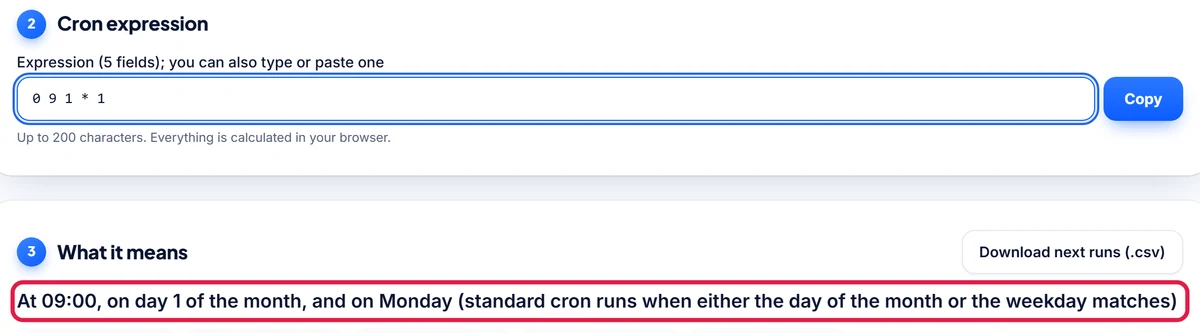
When you paste the expression into the generator, the explanation names both conditions: "At 09:00, on day 1 of the month, and on Monday (standard cron runs when either the day of the month or the weekday matches)". The last part is the warning. If you intended an "and", the expression does not say what you meant.
The rule is described in the manual page crontab(5). It is a long-standing behaviour of the standard format, and it surprises many people, because a spreadsheet filter or a database query would combine two conditions with an "and".
Sunday as 0 or 7, and 1 in Quartz
The numbers of the weekdays are the second trap. In standard cron, the day-of-week field runs from 0 to 7, and Sunday is both 0 and 7. Monday is 1, and Saturday is 6. Names such as MON also work in most implementations.
Quartz numbers the days differently: Sunday is 1, Monday is 2, and Saturday is 7. An expression that you move from a crontab to Quartz, or the other way round, changes its meaning if it uses numbers. The Monday of the crontab, 1, is a Sunday in Quartz. AWS follows the numbering of Quartz, with Sunday as 1.
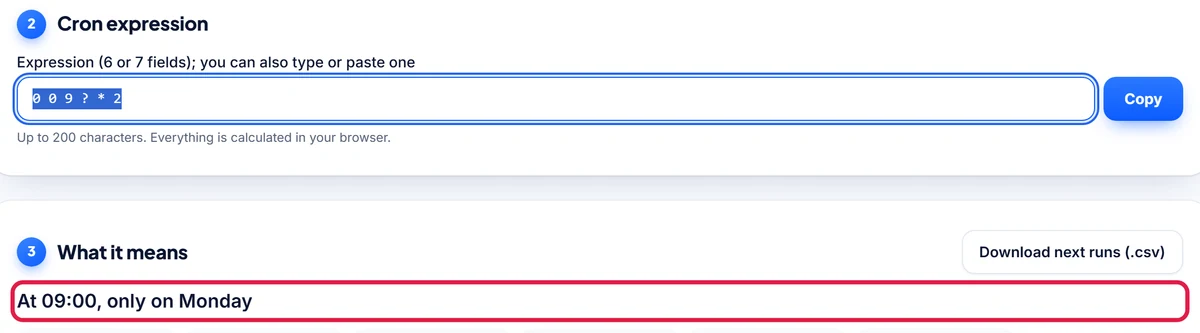
The generator labels the field: in the Quartz and AWS dialects it reads Day of week (1–7, Sun = 1), and in standard cron Day of week (0–7, Sun = 0 or 7). In the Quartz dialect, 0 0 9 ? * 2 is described as "At 09:00, only on Monday", while the 2 would be a Tuesday in a crontab. Use day names in expressions that may be copied between systems. MON-FRI means the same in all the dialects, and it cannot be misread. For the AWS format, see AWS EventBridge Rejects My Cron Expression.
Check with the next 10 runs
The best way to find an OR problem is the list of next runs. For 0 9 1 * 1, the generator lists the runs, and the dates show two patterns: the 1st of the month, and every Monday.
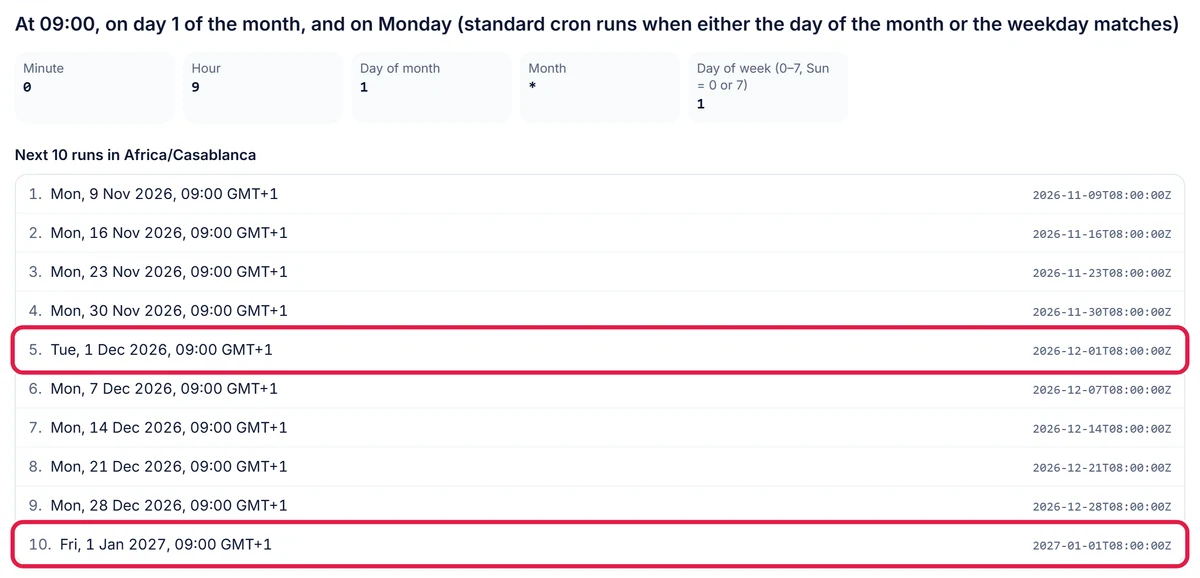
Look at a stretch of two months. If you see more dates than you expect, or dates on days that you did not intend, the OR rule is at work. Compare the list with what you wanted, and do this with every expression that has a value in both day fields. The same check is useful for any schedule, as in Cron Expression for Every Weekday at 9:30.
Ways to get first Monday
Standard cron cannot express "the first Monday of the month" in a single expression, because of the OR rule. Two practical ways exist.
In standard cron, schedule the job on every Monday and let the command check the date. A Monday is the first Monday of the month if its day of the month is 7 or less. The schedule is 0 9 * * 1, and the command starts with a test of the day. In a crontab, the percent sign has to be escaped with a backslash, so the test is written with %d. For example, run the job only if the output of date +%d, read as a number, is at most 7. This relies on the shell, so check your system.
In Quartz, there is a symbol for it. The # sign selects the nth weekday of the month. With Quartz numbering, Monday is 2, so the first Monday is written 2#1 in the day-of-week field, with a ? in the day-of-month field. The name form MON#1 also works. AWS accepts the same kind of expression in its own format.
Test the result in the generator, and check that the next runs fall on the first Mondays: for example 2 November 2026 and 7 December 2026.
Try it
Open the Cron Expression Generator and paste the expression that runs too often. Read the explanation for the two day conditions, read the next 10 runs for extra dates, and replace numbers by day names or use the Quartz form if you need the first Monday.