
Convert a cURL Command to Python Requests
How to convert a curl command to Python requests: headers and json_data, why allow_redirects=False, the Not converted list and the warning for -k.
API documentation and browser developer tools give you requests as curl commands, and your code is in Python. The cURL to Python Converter turns the command into code that uses the requests library, so you do not have to translate the flags by hand. You paste the command, and the tool writes the Python and lists what it could not convert. It never sends the request.
Paste the command and pick Python
- Open the cURL to Python Converter.
- Paste the curl command, or press Try an example.
- Under Output language, Python (requests) is selected by default.
- Read the code, Check before you use it, Not converted and Notes on this translation.
- Press Copy code, or Download .py.
The conversion happens in the tool. The command is not run, and no request is sent to the address in it. This matters when you paste a command from your terminal history, because it may call a real API with real credentials. Replace tokens and passwords with placeholders anyway, as good practice, before you paste a command that you are going to share.
The tool refuses a command that contains shell syntax that cannot be converted safely. For the command curl https://api.example.com/items | jq . it answers "This could not be converted. The command contains "|". Paste a single curl command without pipes, redirects or chained commands." These are features of the shell and not of curl. Split such a command into its parts, and convert the curl part alone.
Worked example: JSON POST with a bearer token
Take the example of the tool, a command that creates an order with a JSON body and a bearer token:
curl -X POST https://api.example.com/v1/orders \
  -H "Authorization: Bearer sk_test_51Hx9" \
  -H "Content-Type: application/json" \
  -d '{"customer_id": 4182, "items": [{"sku": "MUG-01", "qty": 2}], "gift": false, "note": null}'
The converter writes this Python code:
import requests

url = "https://api.example.com/v1/orders"
headers = {
    "Authorization": "Bearer sk_test_51Hx9",
    "Content-Type": "application/json",
}
json_data = {
    "customer_id": 4182,
    "items": [
        {
            "sku": "MUG-01",
            "qty": 2,
        },
    ],
    "gift": False,
    "note": None,
}

response = requests.post(url, headers=headers, json=json_data, allow_redirects=False)
print(response.status_code)
print(response.text)
The headers become a dictionary. The JSON body becomes the dictionary json_data, which is passed with the argument json=, so requests encodes it and handles the content type.
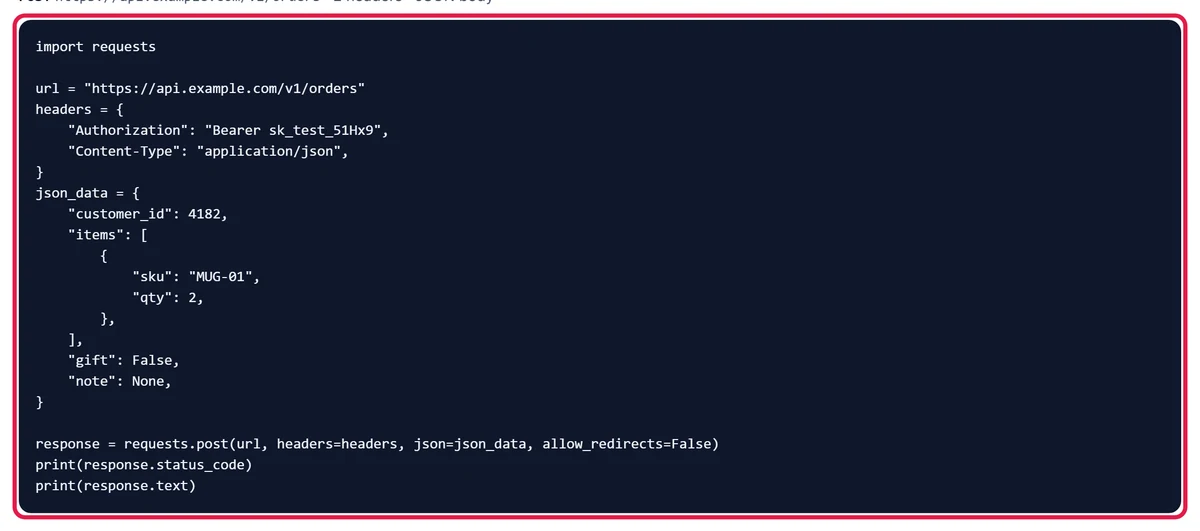
Look at the values in json_data. JSON and Python write some values differently. The JSON false becomes False, and null becomes None, with capital letters, as Python requires. A conversion by hand often forgets this and produces code that fails with a NameError on false.
Why allow_redirects=False
The call ends with allow_redirects=False. The reason is that curl does not follow redirects unless you give it the option -L. The requests library does follow them by default. To make the Python code behave like the command that you pasted, the converter turns the following off. Without -L in your command, the code stops at the first response, even if it is a redirect.

This is important for debugging. If an API answers with a redirect to a login page, curl shows you the 302, and the Python code shows it too. Code that followed the redirect silently would show you the login page with a status of 200, and you would not see what happened.
If your command has -L, the converter leaves allow_redirects out, because the default of requests then matches. If you want to inspect the headers of a response, the HTTP Response Header Analyzer reads them.
The Not converted list
Not every curl option has a counterpart in requests code. The options that the tool could not convert are listed under Not converted, so that nothing is lost silently. An example is -o report.pdf, which saves the response to a file. The list says "saving the response to a file: write the response body to a file in your code", and in Python you write the file yourself from response.content.

Read this list each time. Each item is a behaviour of the command that the code does not reproduce. Decide for each one whether you need it, and add it by hand if you do. The options are described in the curl manual page.
Warnings such as -k
Some options deserve a warning. The option -k tells curl not to verify the TLS certificate of the server. The converter writes the equivalent, verify=False, and it shows the box Check before you use it: "-k turns off TLS certificate checks, so anyone between you and the server can read or change the traffic. Use it only for local testing; the generated code does the same." The notes add that requests prints an InsecureRequestWarning. The option --max-time 30 becomes timeout=30, and the notes say that this limits each wait for data, not the whole download as curl does.
Do not leave verify=False in code that goes to production. It removes the protection against a man-in-the-middle attack. Use it only for a test server with a self-signed certificate, and better, add the certificate to a trusted store.
For the requests library itself, the quickstart covers headers, JSON bodies, timeouts and responses. Add a timeout to your code, because requests waits without a limit by default.
The same tool also works in the other direction: paste Python requests code or a JavaScript fetch call, and it writes the curl command. For other languages, choose JavaScript (fetch), JavaScript (axios), PHP (cURL) or Go (net/http) under Output language. To test with a request that a service really sent, use the Webhook Test URL (Request Catcher), which has a Copy as cURL button for every captured request.
Try it
Open the cURL to Python Converter, paste your command with the secrets replaced by placeholders and pick Python. Check the values in json_data, the notes about allow_redirects, the Not converted list and any warning, and run the code against a test endpoint first.