
AWS EventBridge Rejects My Cron Expression
Why AWS EventBridge rejects a Linux cron line: six fields with a year, the cron() wrapper, the ? in one day field, and how to check the last run of the day.

A cron line that works in a Linux crontab is often rejected by AWS EventBridge, because an AWS cron expression has its own format. It has six fields, including a year, it is wrapped in cron(...), and it needs a question mark in one of the two day fields. The Cron Expression Generator has an AWS dialect that writes the expression in the right form and shows the runs, so you can check it before you save the rule.
The AWS format: six fields and ?
A standard crontab has five fields. The AWS format has six, in this order:
cron(minutes hours day-of-month month day-of-week year)
Three things differ from the line that you may have copied.
- There is a sixth field for the year. It is required. Write * for every year.
- The whole expression is wrapped in cron(...). The text of the schedule field in AWS starts with the word cron and a bracket.
- Either the day-of-month or the day-of-week field must be a question mark, which means "no specific value".
There is no field for seconds, in contrast to Quartz. The three dialects, standard, Quartz and AWS, are similar and not interchangeable, which is why a line that is valid in one fails in another. The generator names the field headers of each dialect, and its error messages tell you what is missing, for example "AWS EventBridge needs 6 fields (minute hour day-of-month month day-of-week year); this has 5. Add a year field, usually *."
In the generator, choose AWS EventBridge (6 fields with year) under Cron dialect before you describe the schedule.

Worked example: every 15 minutes in business hours
Suppose the schedule is "every 15 minutes between 9am and 5pm on weekdays". In the AWS dialect the generator writes:
cron(*/15 9-16 ? * MON-FRI *)
Read it field by field:
- */15: every 15 minutes, at minute 0, 15, 30 and 45.
- 9-16: the hours from 9 to 16.
- ?: no specific value for the day of the month.
- *: every month.
- MON-FRI: Monday to Friday.
- *: every year.
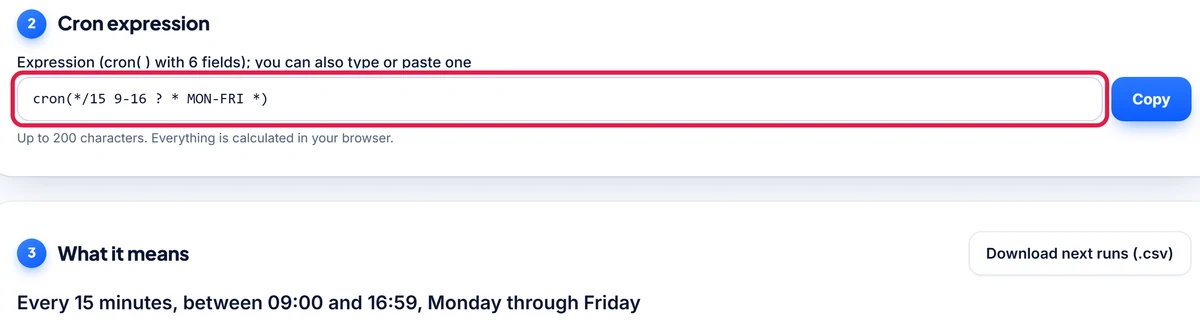
The hours range ends at 16, not at 17. The hour 16 runs from 16:00 to 16:59, so a range of 9-16 covers the time up to the end of that hour. The last run of the day is at 16:45. If you want a run at 17:00 as well, the range has to include 17, and then the runs continue until 17:45, which is not what "until 5pm" means. This is the most common off-by-one error in schedules.
Day names are accepted in capital letters. If you use numbers for the days of the week in AWS, note that they do not follow the usual crontab numbering: in AWS, Sunday is 1, and the generator labels the field Day of week (1–7, Sun = 1). Names such as MON-FRI avoid the confusion.
Day-of-month and day-of-week together
Standard cron lets you fill both day fields, and runs the job when either of them matches. AWS does not allow this. If both fields contain a value, the expression is rejected as invalid.
The rule is simple. Use the day-of-week field for a weekday schedule, and put ? in the day-of-month field, as in the example. Use the day-of-month field for a schedule on a date, and put ? in the day-of-week field. For example, the 1st of every month at 06:00 is:
cron(0 6 1 * ? *)
If you migrate a crontab line that had values in both day fields, decide which condition you meant. The behaviour of the standard format, with its OR rule, is explained in Cron Runs on the Wrong Days: Day-of-Month OR Day-of-Week. A schedule that needs both conditions has to be implemented in the job, which checks the date when it starts.
Check the last run of the day
Validation by AWS tells you whether the expression is accepted. It does not tell you whether it does what you meant. The generator explains the expression in words and lists the next runs.
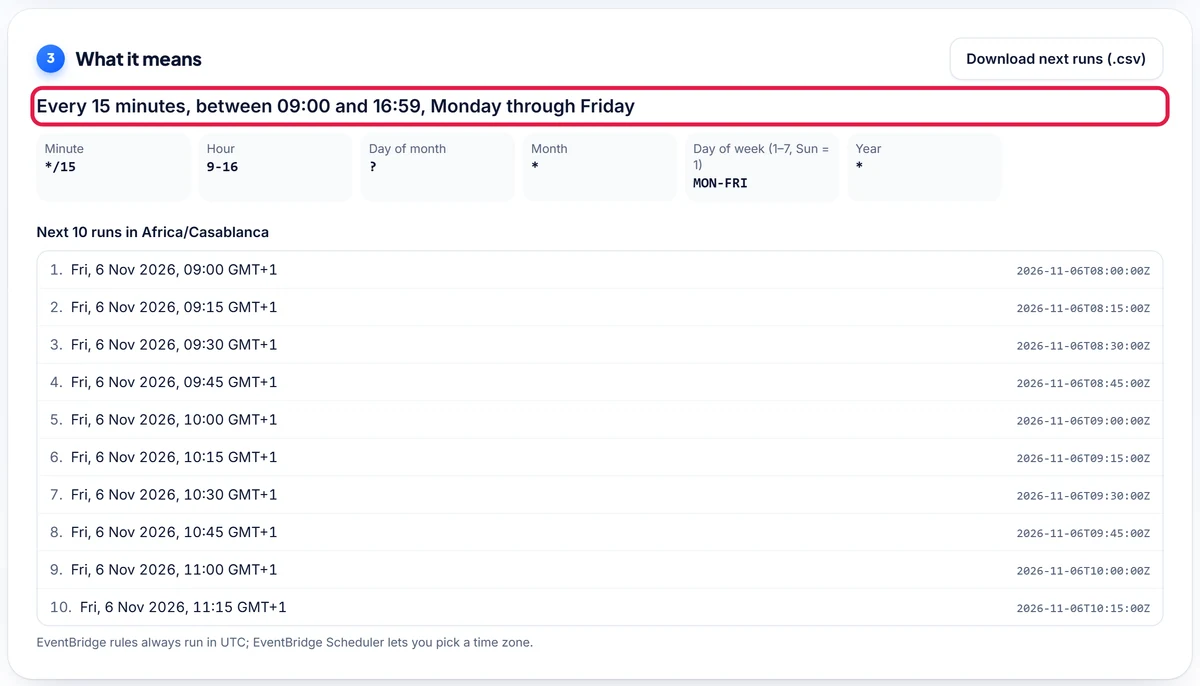
For the example, the explanation says "Every 15 minutes, between 09:00 and 16:59, Monday through Friday". Compare this with your intention. The window ends at 16:59, so the last run of a day is at 16:45. The list shows only the next 10 runs, which here all fall on the first day, so use the explanation to check the end of the day. If the schedule must also run at 17:00, change the hours field, and check again.
Also think about the time zone. The note under the list of runs says that EventBridge rules always run in UTC, while EventBridge Scheduler lets you pick a time zone. For a rule, the hours in the expression are therefore UTC hours, not local ones. The description of the cron expressions is in the AWS documentation for EventBridge scheduled rules. The generator shows runs in the zone that you choose with the UTC equivalent, which helps with the conversion.
Try it
Open the Cron Expression Generator, pick the AWS dialect and describe your schedule. Check that the expression has six fields in cron(...), that one of the day fields is ?, and that the last run of the day is where you expect it.