
Extract Phone Numbers and Amounts From Text
How to extract phone numbers from text in E.164: the default country, day-first or month-first dates, amounts with currency codes, IBAN checksums and why a number may be missing.
Notes, emails and chat exports are full of phone numbers and amounts written in every style. Paste the text into the Text Data Extractor to get the phone numbers in one standard form. It writes phone numbers in E.164, amounts with the currency code, and checks IBAN-like numbers with their checksum. Two settings, Default country for phone numbers and Dates like 03/04/2026 are, decide how doubtful values are read.
Default country for numbers without +
A phone number that starts with + or 00 carries its country code. A number written in the national form, such as 020 7946 0958, does not, and the same digits mean different numbers in different countries. The tool needs to know which country to assume.
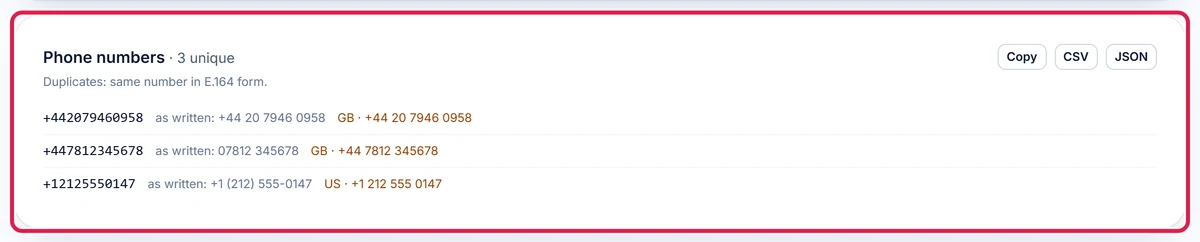
Choose the Default country for phone numbers under the text box. Numbers without a country code are read as numbers of that country and written in E.164, the international form with a plus sign, the country code and the number, without spaces. With GB as the default, which is the setting when the page opens, the national number 07812 345678 becomes +447812345678. The result shows the original text next to it, for example "as written: 07812 345678", and the country that was used.
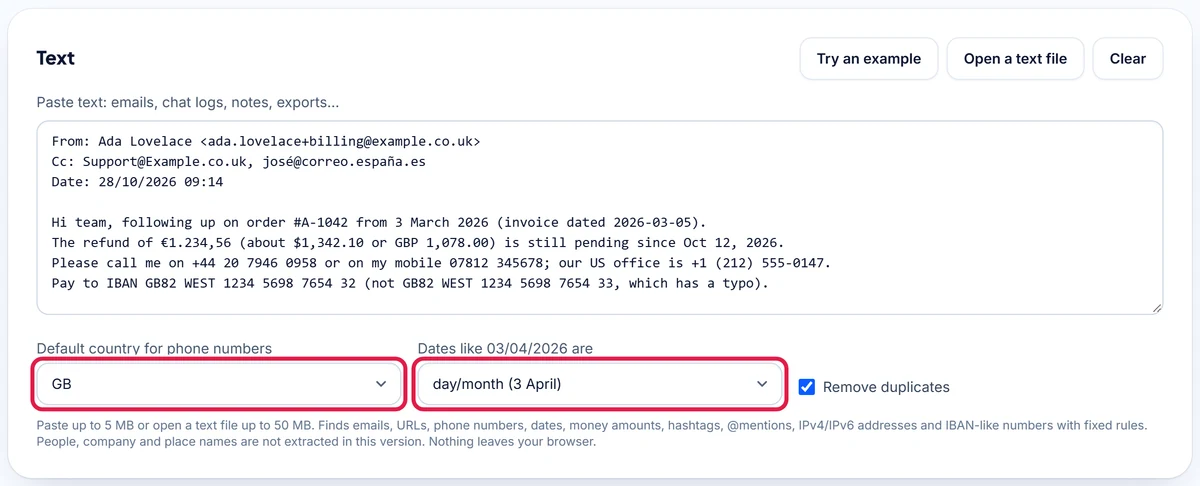
Numbers that already have a country code keep it, whatever the default country is. So a text that mixes numbers from several countries is read correctly, as long as the foreign numbers are written with + or 00. If many numbers in your text are national numbers of different countries, the default country will be wrong for part of them, and you need to check those.
The standard behind the form is the ITU-T recommendation E.164. Phone numbers in a CSV file are handled in Standardize Phone Numbers to E.164 in a CSV.
Day-first or month-first dates
Dates in notes are ambiguous in the same way. The date 03/04/2026 is 3 April in much of the world and 4 March in the United States. The text does not say which it is.
The tool asks you to choose in the menu Dates like 03/04/2026 are: day/month (3 April) or month/day (4 March). With day first, 03/04/2026 becomes 2026-04-03. With month first, it becomes 2026-03-04. The result is written in the form YYYY-MM-DD, which has no ambiguity.
Choose by the origin of the text. If you are not sure, look for a date in the text that settles the question, such as 25/12/2026, which can only be day first. A text from a single source normally uses one order throughout, so one setting fits the whole text.
If you have a CSV with dates and not free text, see Standardize Dates in a CSV: Day-First or Month-First for the same problem in a table.
Amounts and IBANs
Amounts are found with their currency and written in a standard form: the currency code followed by the number with a point as the decimal mark, for example EUR 1234.56. In the example, €1.234,56 is listed as EUR 1234.56, $1,342.10 as USD 1342.10 and GBP 1,078.00 as GBP 1078.00. The text as it was printed is shown next to each amount, so you can compare the two.

IBAN-like numbers, the international bank account numbers, are checked. An IBAN has a built-in checksum: two check digits that must agree with the rest of the number, which is verified with a standard calculation. A number that looks like an IBAN but fails the check, for example because of a typing error in one digit, is flagged. In the example, GB82 WEST 1234 5698 7654 32 is marked "checksum valid", and the same number ending in 33 is marked "checksum NOT valid (typo or not an IBAN)".
A passed checksum proves only that the number is well formed. It does not prove that the account exists or belongs to the person you think. For payments, confirm bank details through a second channel.
Why a number is missing
If a number that you can see in the text is not in the result, one of these is the usual cause:
- It is a national number and the default country is wrong, so the digits do not form a valid number for that country.
- It is too short or too long, or a digit is missing, so it is not a valid phone number anywhere.
- It is part of a longer run of digits, such as an order number or a reference, and is not a phone number.
- It is separated by unusual characters, or written in words, which the tool does not read.
- An IBAN fails the checksum, because of a typing error.
Check the doubtful numbers against the text. For numbers that look like phone numbers but are not valid, a CSV tool that lists the invalid values helps; the CSV Phone, Email & Name Standardizer does this for tables.
For email addresses from the same text, see Extract Email Addresses From Text and Remove Duplicates. The same text also gives dates, links, hashtags, @mentions and IP addresses in their own groups.
Try it
Open the Text Data Extractor, paste your text and choose the default country and the date order. Read the phone numbers in E.164, the amounts with their currency and the IBANs, and check any number that you expected and did not find.