
SPF Has Too Many DNS Lookups: Fix the 10 Limit
SPF too many DNS lookups: what counts toward the limit of 10, how to read the include tree, remove ptr and unused includes and avoid void lookups that cause permerror.
When an SPF record needs more than 10 DNS lookups, receiving mail servers stop checking and the result is a permanent error, permerror. SPF then fails for every message from your domain, even though each service in the record is correct. The SPF, DKIM & DMARC Checker counts the lookups of your record, including the nested ones, and shows which parts cause them.
What counts as a lookup
SPF is checked by a receiving server through DNS queries. To protect the DNS system from abuse, the standard limits the number of queries to 10 for each check. The limit is set in RFC 7208, in the section on DNS lookup limits.
These parts of a record each count as one lookup:
- include
- a
- mx
- ptr
- exists
- redirect
Includes are counted with everything inside them. If you include the record of a mail service, and that record contains three more includes, the cost of your include is four, not one. The counting is recursive.
The mechanisms that carry addresses directly, such as ip4 and ip6, need no lookup and are free. The same goes for all.
The checker counts this for you and stops the recursion at 10 levels. It also detects loops, where an include refers back to itself.
Worked example: 11 lookups
Take a company that uses many services to send mail. On 6 November 2026, the SPF record of etsy.com listed a long series of ip4 ranges and then includes such as servers.mcsv.net, mail.zendesk.com, amazonses.com, three Google netblock records and a few more, one of which includes _spf.google.com in turn. The checker counted 11 lookups, shown as "11 of 10 DNS lookups", and reported a Problem: "11 DNS lookups (include, a, mx, ptr, exists, redirect), counting every nested include. The limit is 10: receivers stop and SPF fails (permerror). Remove senders you no longer use, or replace includes with ip4/ip6 ranges."
Receivers stop at 10. For this record, the 11th lookup is never made, and the receiver returns permerror. The result for the message is a failed SPF check, and with a DMARC policy in place, the message may be rejected or put into spam.
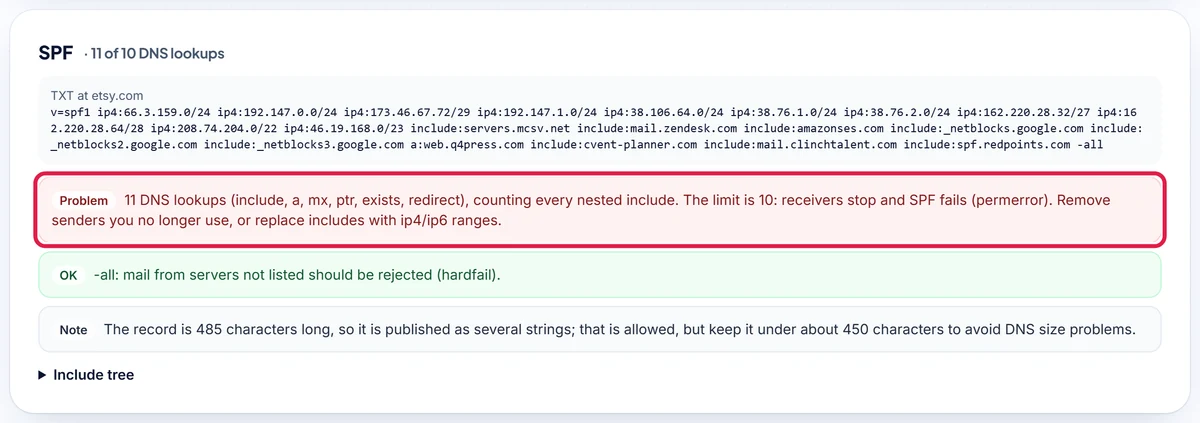
The checker shows the failure as a message and the count, so you see that the limit is exceeded and by how much. A record can be at 10 for years and tip over when one of the providers adds a nested include to its own record. This is why a working SPF record can break without a change on your side.
Check the full set of authentication records of a domain in Check SPF, DKIM and DMARC Records for a Domain.
Read the include tree
The checker displays the lookups as a tree. The top is your record, and the branches are the includes, each with the mechanisms that it contains and their cost.
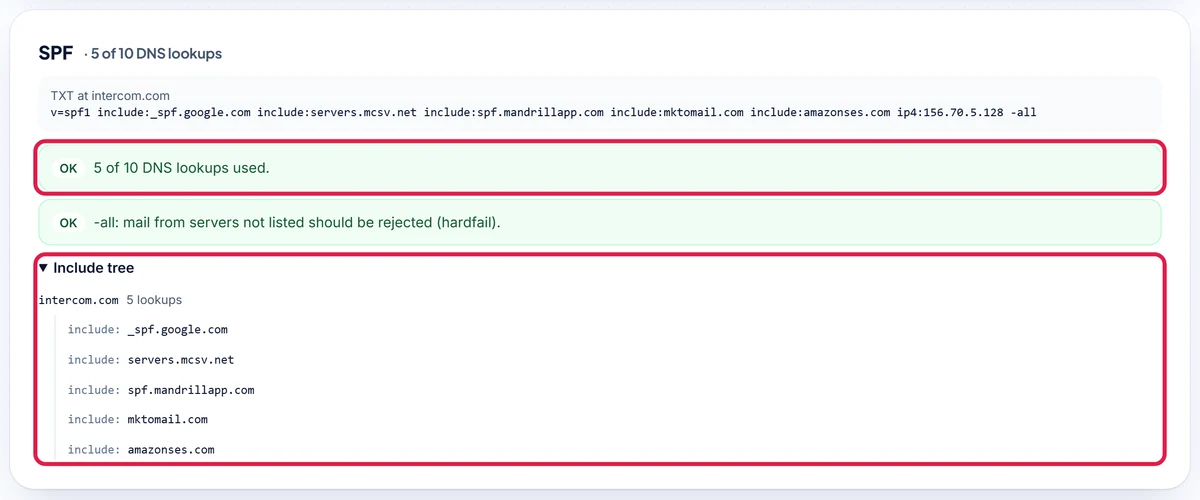
Under the SPF result, the item Include tree opens the tree. For intercom.com, the check says "5 of 10 DNS lookups used.": its record has five includes, _spf.google.com, servers.mcsv.net, spf.mandrillapp.com, mktomail.com and amazonses.com, one ip4 address and -all, so five lookups remain. Use the tree to see what is expensive. A single include of a large provider can account for several lookups, and some providers have a deep structure.
Look for three things:
- Includes of services that you no longer use.
- Mechanisms that you do not need, such as a and mx on a domain that does not send mail from its web server.
- Providers that use many nested includes.
Remove ptr and unused includes
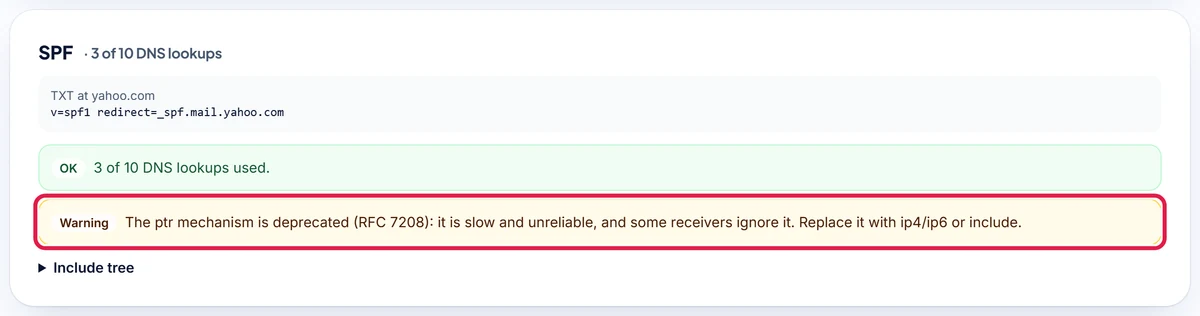
Start with the easy savings. The ptr mechanism is deprecated. The standard advises against it, because it is slow, unreliable and puts a load on DNS. The checker flags it: "The ptr mechanism is deprecated (RFC 7208): it is slow and unreliable, and some receivers ignore it. Replace it with ip4/ip6 or include." For yahoo.com, whose record redirects to _spf.mail.yahoo.com, that record contains ptr:yahoo.com and ptr:yahoo.net, and the warning appears next to a count of 3 of 10 lookups. Remove it. Every sender can be listed with ip4, ip6, include or a, so ptr is never needed.
Then remove includes for services that you stopped using: an old newsletter tool, a former CRM, a trial that was never cancelled. They remain in many records for years.
After these changes, check again. The count shows how many lookups you saved, and when the published record can be cleaned up, the checker also shows a Suggested SPF record, without ptr, duplicates and invalid parts, that you can copy. Compare it with the old one. If the count is now at or below 10 with room to spare, publish the new record.
If you still need more, replace an include of a service with a stable address range as ip4 or ip6. This is sometimes called flattening, and it carries a risk: the provider can change its addresses, and your copy goes stale, which makes valid mail fail. Use it only for senders whose ranges are fixed, and review it regularly. Another approach is to send each service from its own subdomain, where each subdomain has a separate SPF record with its own 10 lookups.
A domain must have only one SPF record. When you edit, do not create a second one. See Two SPF Records on One Domain: Merge Them.
Void lookups
A void lookup is a lookup that returns no data: the name does not exist, or it has no records of the needed type. The standard limits void lookups to 2. A third one also leads to permerror.
Void lookups usually come from mistakes: an include with a typo in the domain name, an include of a provider that has removed its record, or an a mechanism for a name that has no address. The checker reports them. Fix the name or remove the mechanism.
Check the names in the record with the DNS Lookup & Domain Info tool, and confirm that each include resolves to a record that starts with v=spf1.
For the whole setup, use Email Authentication Setup Checklist.
Try it
Open the SPF, DKIM & DMARC Checker, enter your domain and read the count of lookups in the SPF result. Look at the include tree, remove ptr and unused includes, check for void lookups, and publish the new record when the count is safely below 10.