
Create a Policy Document From a Template
How to start a policy, such as a remote work policy, with the SOP and Policy Template Generator: the six sections, the gaps to fill, what the AI does not add and how to keep it current.
Anyone who has to write a policy, such as a remote work policy, usually starts from a blank page and a vague idea of what belongs in it. The SOP & Policy Template Generator gives a structure at once: purpose, scope, roles, steps, measures and a revision history. You describe the policy, generate a draft in the browser and then adapt it to your organisation. The draft is a skeleton, and this guide is honest about how much it contains.
Pick the policy type
The same generator covers procedures and policies. A procedure describes how a task is done, step by step. A policy states the rules that people have to follow and why. The menu Document type offers Standard operating procedure (SOP), Policy, Onboarding checklist and Process documentation. The only built-in example is a refund SOP, so for this guide I generated the other drafts myself.
Choose Policy, and describe it with the same inputs as for an SOP: the Process name, the Industry, the Team size and the Owner or author. The details are put into the text: for a remote work policy in software with 50 people, the purpose reads "This policy sets out the rules for Remote work policy in our Software organisation, so that everyone applies them the same way."
If what you need is a step-by-step procedure, see Write an SOP From a Template in Minutes, which describes the full workflow, including the improvement with AI and the export.
Worked example: remote-work policy
The draft has the same six numbered sections as an SOP: 1. Purpose, 2. Scope, 3. Roles and responsibilities, 4. Steps, 5. KPIs and 6. Revision history. Under Roles it names the owner, "Maria Lopez keeps this policy up to date and answers questions about it", and the team members, who "follow the steps below and report problems to the process owner". The generator does not write sections such as eligibility, equipment, expenses or health and safety. You add them yourself, for example as steps or as extra rows. A typical remote work policy covers who may work remotely, working hours and availability, equipment and security, expenses and health and safety.
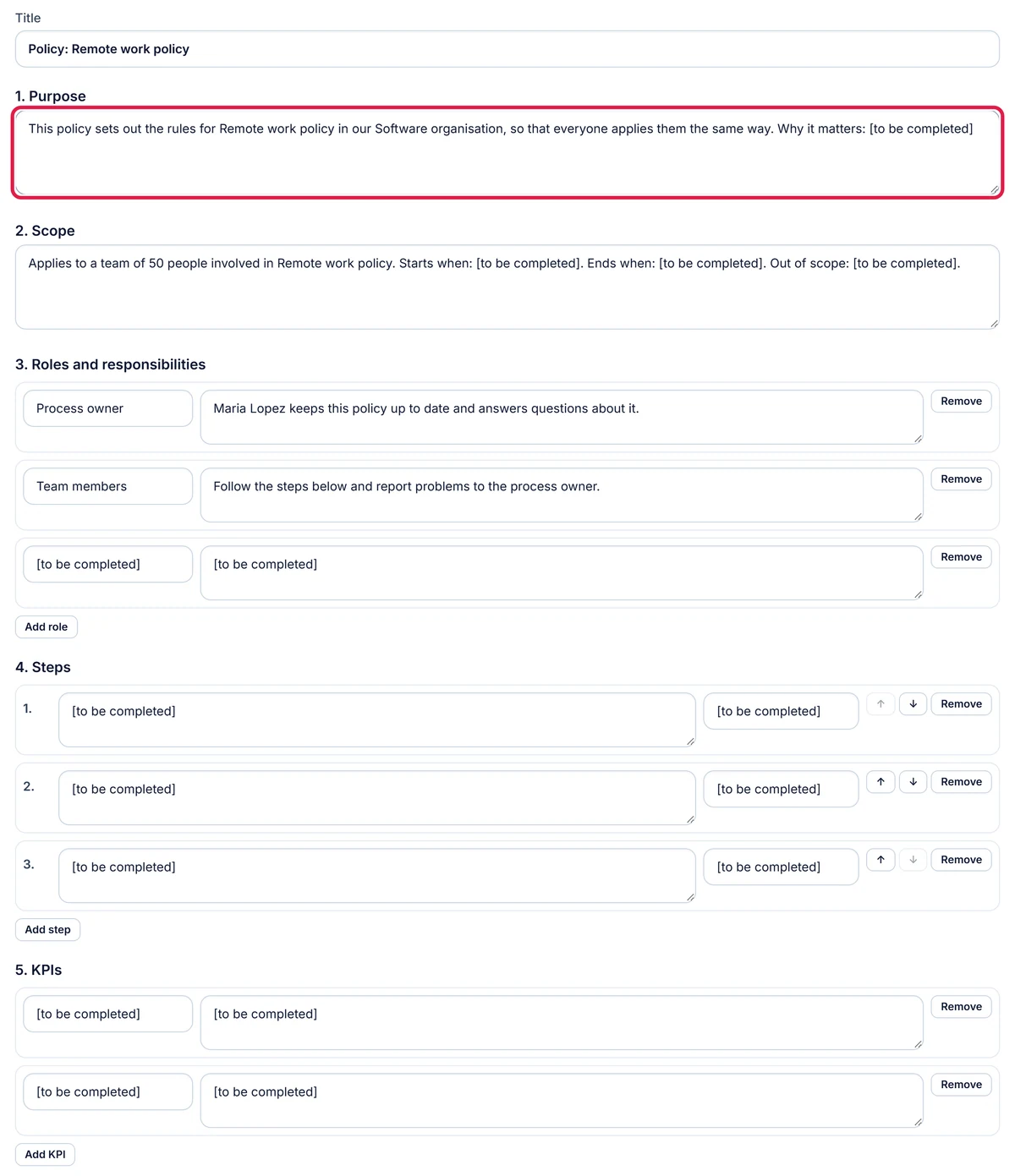
Without key steps, most of the draft is gaps, each marked "[to be completed]": the reason why the policy matters, when it starts and ends, what is out of scope, three steps and two KPIs. These are the facts that only your organisation knows: which roles may work remotely, how many days, which core hours apply, who approves exceptions. Fill each of them, or write the steps in Key steps and press Improve with AI. Do not leave a gap in a policy that employees will rely on.
Then adapt the wording. A template is neutral. Your policy has to match your culture and your contracts. If remote work is part of the employment contracts of your staff, check that the policy does not contradict them. The Contract Key Terms Extractor can help you find the relevant terms in a contract, and Contract Review Checklist: Terms to Find First lists what to look for.
What the AI will not add
The generator does not tell you which laws apply, and the template invents no regulations. The same holds for Improve with AI: in my test it listed the questions that stay open and wrote no legal references. A policy often depends on law: working time, health and safety at home, data protection, tax and social security when people work from another country. The tool leaves these points open, because it does not know your country, your sector or your situation, and a wrong legal reference in a policy is worse than none.
You have to add the legal requirements yourself, or with an adviser. A list of what to check for a remote work policy:
- Working time and rest rules of the country where the employee works.
- Employer duties for health and safety at the place of work.
- Data protection when company data is handled at home.
- Rules for equipment, expenses and insurance.
- Consequences of working from another country.
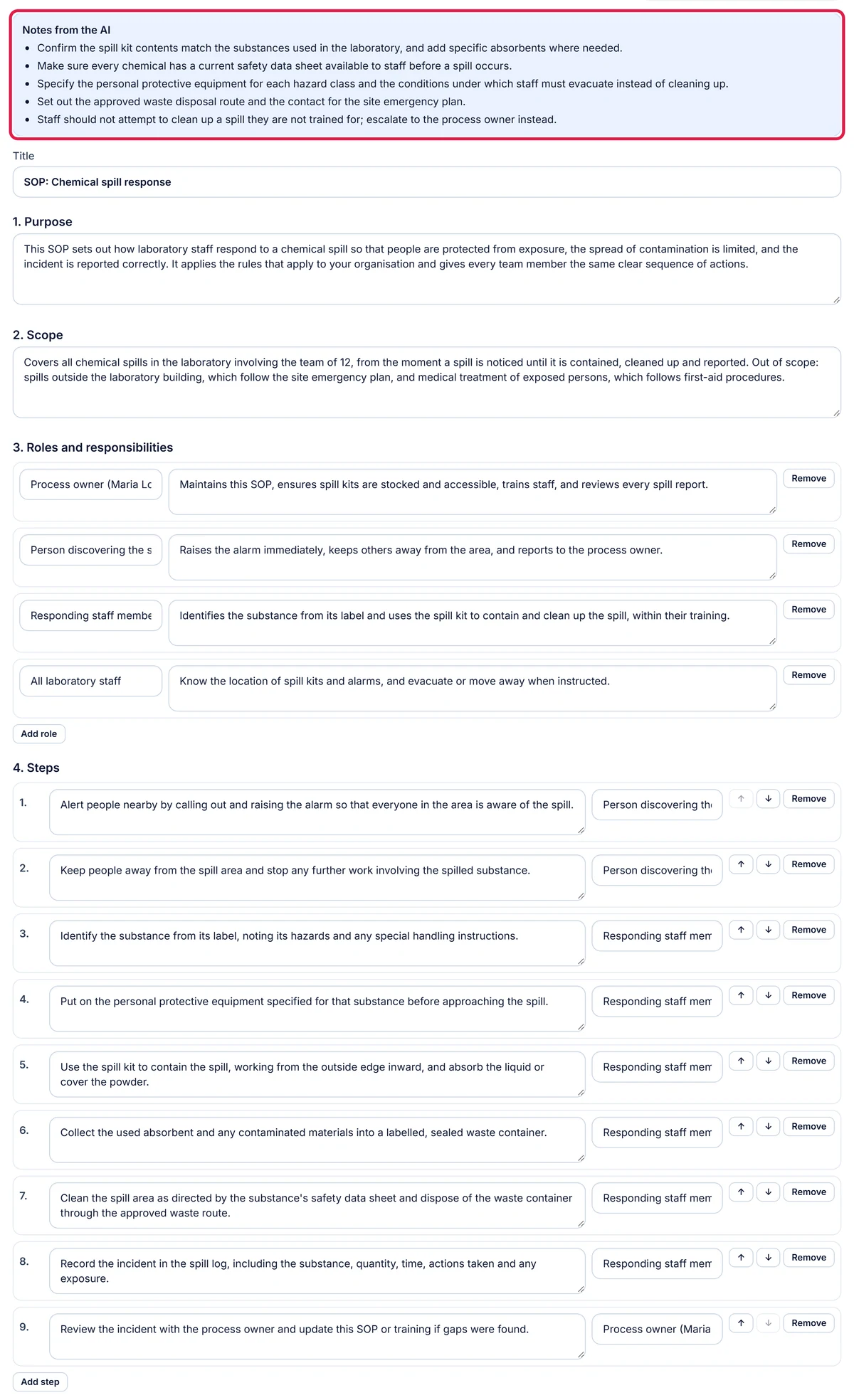
A procedure for a hazardous substance is a good case for care, because it is safety-critical. I gave the tool the process Chemical spill response, a laboratory of 12 people and three key steps, and pressed Improve with AI. It returned a complete draft with roles, steps and KPIs, and a box Notes from the AI that lists what you still have to decide. In my test it asked, among other points, to specify the personal protective equipment for each hazard class and the conditions under which staff must evacuate instead of cleaning up, and to set out the approved waste disposal route. Treat the result as a structure. Have a qualified person, such as a safety officer, write and approve the actual steps, the protective equipment and the reporting duties.
Revisions and owners
A policy that is not maintained becomes wrong. The generator ends with the section 6. Revision history, a row with the version 1.0, today's date, the owner and "Initial draft". The buttons Add role, Add step, Add KPI and Add revision extend each section. Use them.
- Steps: write each step as one action by one role.
- Roles: name who does, who approves and who is informed, by job title.
- KPIs: choose measures that you can track, such as the share of staff who have read and confirmed the policy. Do not add numbers that you do not have.
- Revisions: record the version, the date, what changed and who approved it.

Name an owner for the document, a person who is responsible for keeping it current, and set a date for the next review. Many organisations review policies once a year, and sooner when the law or the way of working changes.
When the policy is ready, export it with Download Word (.docx), Download Markdown, Copy or Print / Save as PDF, as explained in the guide on SOPs. Have the policy checked by someone who knows the law that applies to you, before you publish it.
Try it
Open the SOP & Policy Template Generator, describe the policy and generate the draft. Fill every "[to be completed]", add the legal requirements with your adviser, edit steps, roles and KPIs, and complete the revisions table with a version, a date and an owner.