
Build Nested JSON From a CSV With Dotted Headers
How to build nested JSON from a CSV: dotted headers become objects, numeric parts become lists, and the converter renames empty or repeated headers.
A CSV is flat, but many APIs expect JSON with objects inside objects and lists of values. To get nested JSON from a CSV, name the columns with dots, such as user.name, and keep Build nested objects from column names ticked in the CSV to JSON Converter. The dots in the header tell the converter where one level ends and the next begins, and numbers in the header create lists.
How dotted headers map to objects
Each dot in a header name is a step into a nested object. The header user.name means: an object called user that has a key called name. Several columns that start with the same word are collected into the same object.
Take a CSV with the header and one row:
id;user.name;user.tags.0;user.tags.1
7;Mia;admin;ops
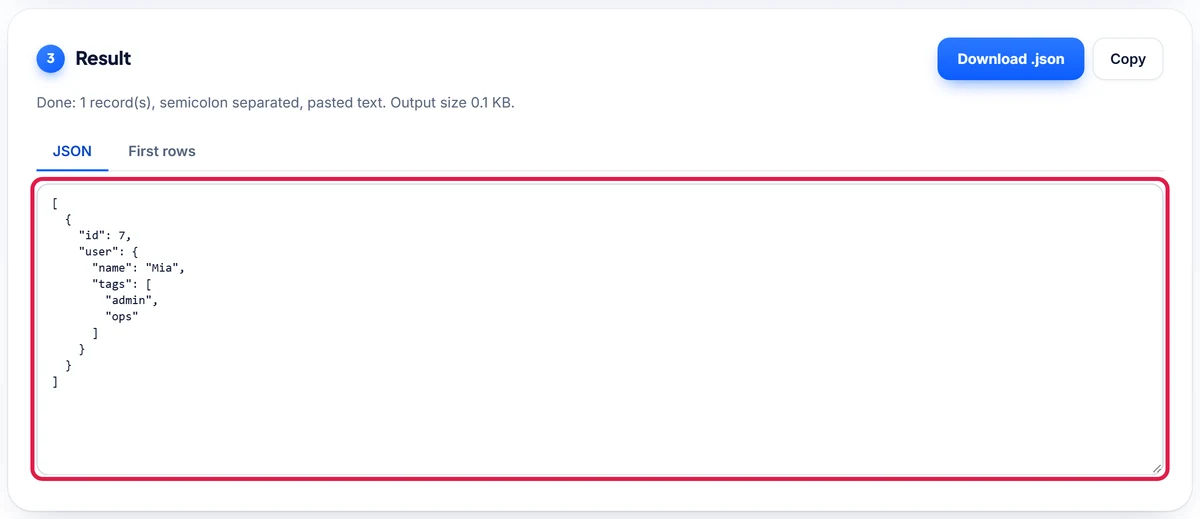
With nesting on, the converter writes an array with one object like this (shown on one line here):
{"id": 7, "user": {"name": "Mia", "tags": ["admin", "ops"]}}
The column id stays at the top level and becomes the number 7. The columns that start with user. are collected in one object. The values Mia, admin and ops stay text.
Names must be consistent. user.name and User.name are two different keys, and a typo in one header creates a second object next to the first. Check the result for objects that you did not expect.
Numeric parts create arrays
When a part of a header is a number, the converter does not create an object but a list. The columns user.tags.0 and user.tags.1 become the list tags with two items, in the order of the numbers: .0 is the first item and .1 is the second.
This is how a flat table can hold a list of values. Add a column for each item, and number them from 0. If a row has fewer items than others, the unused cells become null by default, so a short list ends with null entries. Keep the number of columns for the longest list that you have, and untick Empty cells as null if you prefer empty strings.
You can combine both ideas. A header such as orders.0.sku and orders.1.sku gives a list of objects, each with a sku. This is how line items of an order are written in one row.
The reverse direction, from nested JSON to CSV, uses the same names, and Convert Nested JSON to CSV by Flattening Objects describes it.
Steps with Build nested objects
- Open the CSV to JSON Converter.
- Paste the CSV or open the file.
- Under Options, check the Delimiter and the File encoding. Both are set to Detect automatically.
- Make sure Build nested objects from column names is ticked, and Numeric parts (items.0) make arrays if your headers use numbers. Both are ticked when the page opens.
- Check the result and press Download .json.
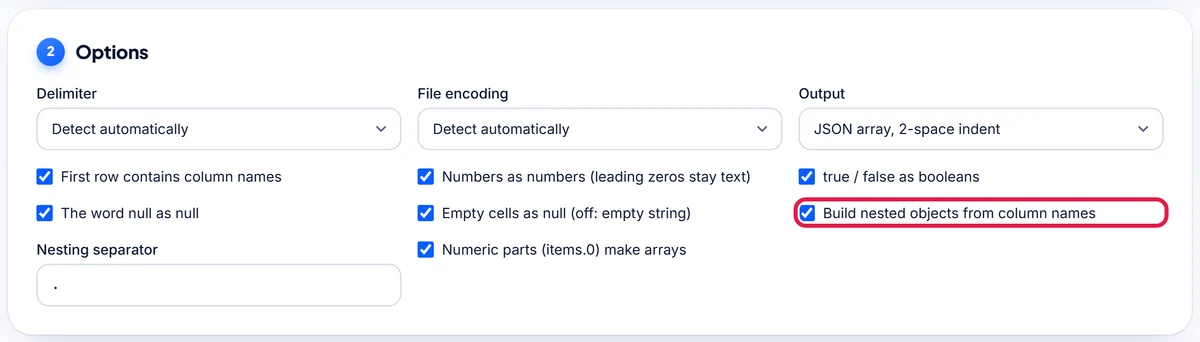
Without the option, the converter writes the headers as they are, and the result is flat: the key is the text "user.name" with the dot inside. With the option on, the dots are read as levels.
In the example, the delimiter is a semicolon. The converter detects it from the data and names it in the line under Result, for example "2 record(s), semicolon separated". Check that line before you download, because a wrong delimiter puts the whole header in one column.

Headers that are empty or repeated would make keys collide, so the converter renames them. An empty name becomes column_5 when it is the fifth column, and a repeated name gets _2, _3 and so on. A note under Result lists every rename, so you can see what changed and fix the header in the source if you prefer your own names.
For the general workflow of the tool, see Convert CSV to JSON Without Uploading the File. Values with leading zeros or very long digits stay text, which is also described there and in CSV to JSON Drops Leading Zeros: Keep Zip Codes as Text.
Round-trip back to the same JSON
A useful test is the round trip. Convert your CSV to nested JSON, convert the JSON back to CSV with flattening on, and compare the header with the original. If the dotted names, the numbers and the order come back, the structure survived.
The test shows problems early. A gap in the numbers, such as .0 and .2 with no .1, puts a null in the missing position, and a repeated column name is renamed with _2. A round trip also shows whether a value that you wanted as text was turned into a number.
The syntax of objects and arrays is defined in RFC 8259. Validate the result if the receiving system is strict, and keep the CSV as your source of truth, so that you can change a header and run the conversion again.
Try it
Open the CSV to JSON Converter and paste a CSV with dotted headers. Check the detected delimiter, switch on Build nested objects, and compare the preview with the structure you want before you download.