
CSV to JSON Drops Leading Zeros: Keep Zip Codes as Text
Why 02134 becomes 2134 in some tools, which values the converter keeps as text, why a zip column can end up mixed, and how to handle empty cells.

If a zip code such as 02134 comes out of a CSV as 2134, the tool that converted it treated the digits as a number. The fix is to keep identifiers as text. The CSV to JSON Converter keeps zip codes such as 02134 as strings, and it keeps other number-like values as text when converting them would change them.
Why leading zeros disappear in other tools
A number has no leading zeros. When a program decides that the digits 02134 are a number, it stores 2134, and the zero is gone. This happens in several places:
- Excel formats a column of digits as numbers by default, so a zip code that is opened and saved again loses its zero.
- Libraries that guess the type of each column, such as the CSV readers of many programming languages, convert all-digit columns to integers.
- JSON itself does not allow a number with a leading zero. In RFC 8259 a number cannot start with 0 unless it is the single digit zero, so a converter that writes 02134 without quotes would produce invalid JSON.
The result is that zip codes, phone numbers, product codes and account numbers lose information, and the loss cannot be undone from the JSON. The number of digits is part of the value. The rules for numbers and strings are in RFC 8259.
If the CSV was already saved by Excel with the zeros removed, the damage is in the file and the converter cannot restore it. Go back to the original export, or pad the column in the source, for example with TEXT(A2,"00000") for five-digit codes.
How the converter decides types
A CSV has no types, so the converter decides for every value whether it is a number or text. A plain number such as 42 becomes a JSON number. Anything that could lose information if it were converted stays text. These values stay text:
- Zip codes and other values with a leading zero, such as 02134.
- Numbers with thousands separators, such as 1,250.
- Numbers with a decimal comma, such as 3,14.
- Numbers with a leading plus sign, such as +4412345.
- Numbers longer than 15 digits, which a floating-point number cannot hold exactly.
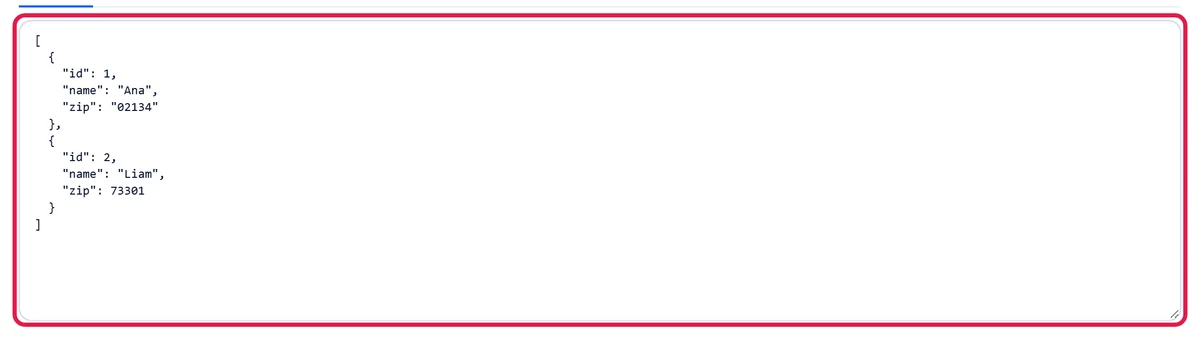
In the zip-code example, the value 02134 appears in the JSON in quotes, as the string "02134". The zero is kept, and the JSON is valid. For the last case, long numbers, the problem is not the zeros but the rounding of the last digits, which is described in JSON Big Numbers Rounded: Keep 64-bit IDs Exact.
Choose which types to infer
Sometimes you want the opposite: a column that holds quantities should be numbers, not text. Check the type options in the Options section before you download: Numbers as numbers (leading zeros stay text), true / false as booleans, The word null as null and Empty cells as null. Each one can be switched off, and with Numbers as numbers off, every value that is not a boolean or null stays text.
A rule of thumb helps. Convert values you calculate with: quantities, prices, counts. Keep values you only identify things with: zip codes, phone numbers, product codes, IDs. A value that you would never add up should be text, even when it consists of digits.
After the conversion, look at the result. Quotes around a value mean text, and no quotes mean a number. A column of zip codes shows the catch: 02134 keeps its quotes, but 73301 has no leading zero, so it becomes the number 73301. The same column then holds text and numbers, which many receivers reject. If the receiver expects one type for a field, untick Numbers as numbers (leading zeros stay text) and every value stays text. That switch applies to all columns, so quantities and prices become text as well. If that is a problem, convert the identifier column in a separate pass or fix the JSON afterwards.
The general workflow of the tool is described in Convert CSV to JSON Without Uploading the File.
Empty cells as null
Empty cells in a CSV raise a second question: what should the JSON contain? An empty string "" and null are different values, and some systems treat them differently. The option Empty cells as null (off: empty string) is ticked by default and writes null for an empty cell. Untick it to get "" instead.
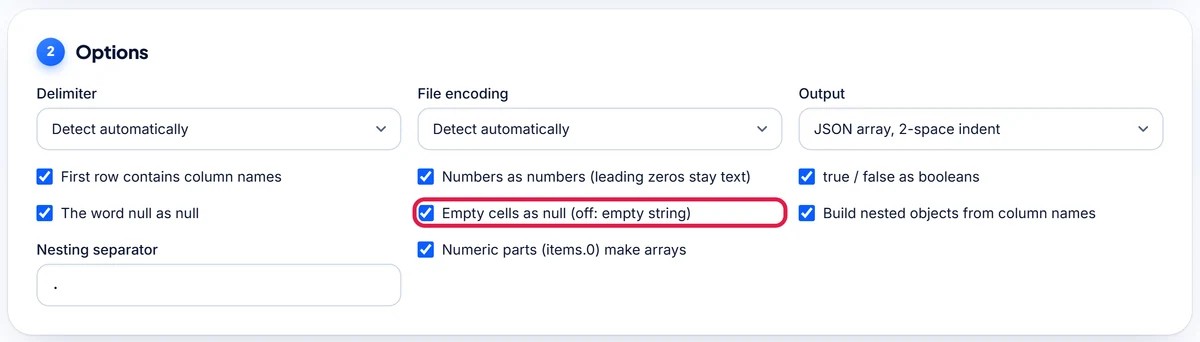
Use null when the receiver distinguishes "no value" from "an empty text", for example a database column that allows NULL. Keep the empty string when the receiver expects every field to be a string. Do not mix the two in one file by hand, because the receiver then has to handle both.
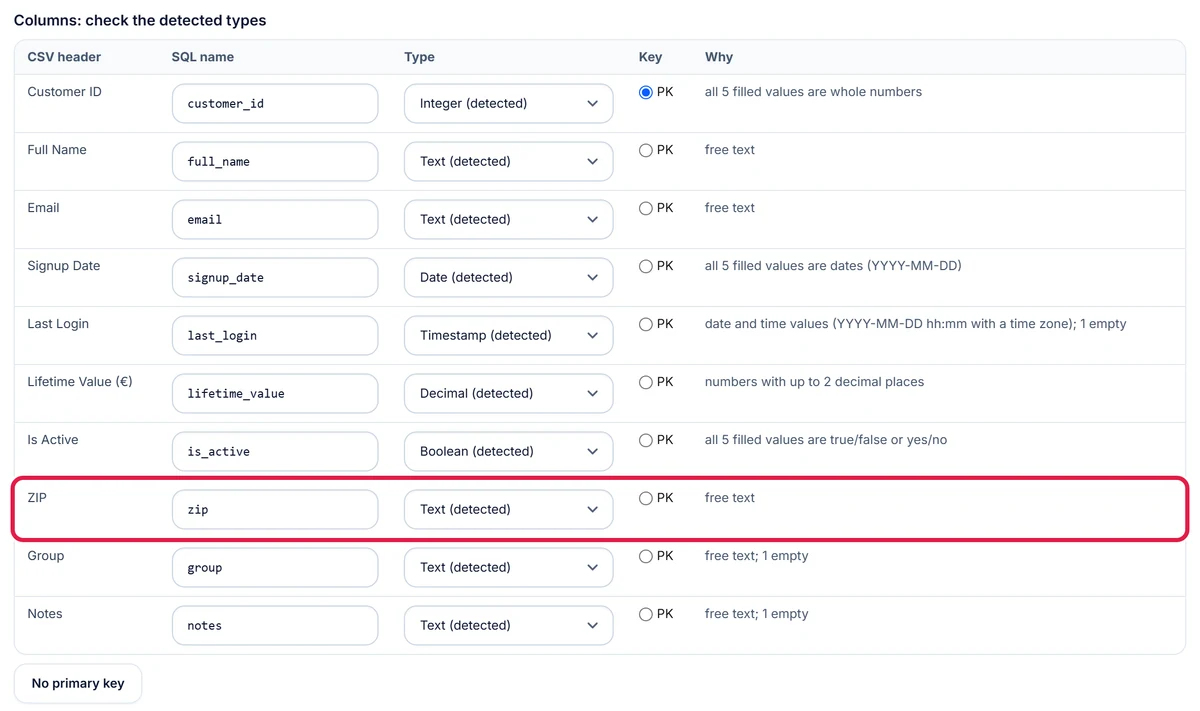
The same issue exists when the data goes into a database. In the CSV to SQL INSERT Generator, a zip column should be a text type, because a numeric column would drop the leading zero again. Check the type that the generator detected for your zip column and keep it on Text.
Try it
Open the CSV to JSON Converter and load your CSV. Look at the zip-code column in the preview, check that it is in quotes, choose how to handle empty cells, and download the JSON.