
Markdown Table Breaks on a Pipe Character
Why a pipe character splits a Markdown table cell, how \| fixes it, how line breaks become <br>, and when to use HTML output instead.

A Markdown table that shows an extra column, or cuts a cell in two, usually has a pipe character inside a cell. The pipe separates columns in Markdown, so a cell that contains one is read as two cells. The fix is to escape the pipe as |. The Excel to Markdown Table Generator does that for you, and it also handles line breaks and special characters.
Why a pipe splits the cell
In a Markdown table, every pipe marks the border between two cells. The parser does not know that a pipe belongs to the text of a cell. Take this row of a table with two columns:
| Name   | Note |
| ------ | ---- |
| Filter | a|b  |
The last row has three cells: Filter, a and b. The table has two columns, so the extra cell is either dropped or shown in an extra column, depending on the renderer. The text a|b is not displayed as written.
This happens often when a spreadsheet holds command lines, regular expressions or logical expressions, for example a|b in a regex or a shell pipeline. The rule is set out in the table section of the GitHub Flavored Markdown spec. It also says that a pipe inside a code span must be escaped.
How the generator escapes it
Paste the cells from Excel or Google Sheets into the generator. Markdown is the default output format. A pipe inside a cell is written as |, so the row becomes:
| Filter | a\|b |
The renderer shows a|b in one cell, and the table keeps its two columns.
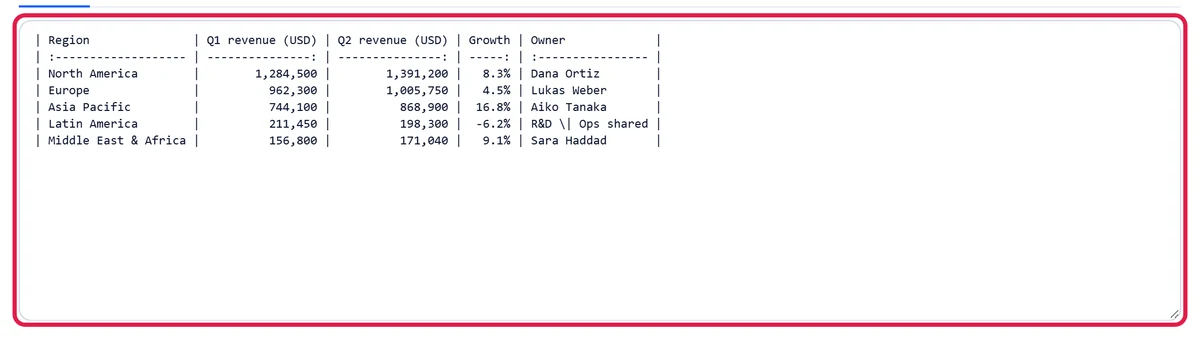
You do not have to find the pipes yourself. Every cell is checked, and the escape is added wherever it is needed. If you edit the Markdown afterwards by hand, remember the rule: a new pipe inside a cell needs the backslash.
The guide Paste an Excel Table Into GitHub as Markdown describes the whole workflow, including headers and alignment.
Line breaks as
The second common cause of a broken table is a line break inside a cell. A cell in Excel can hold several lines, but a row of a Markdown table must be on a single line. A real line break ends the row, and the rest of the text becomes a new, broken row or a paragraph after the table.
The generator replaces each line break with
, which GitHub and many other renderers display as a break inside the cell. The same replacement is used for the HTML output. A cell with two lines, such as the address 12 Main Street and Springfield, becomes one line with
between the parts.
Check the preview if your cells hold addresses, comments or lists. Renderers that do not allow HTML inside a table show the
as text. In that case, the break has to go, and you can replace it with a space or a semicolon in the source.
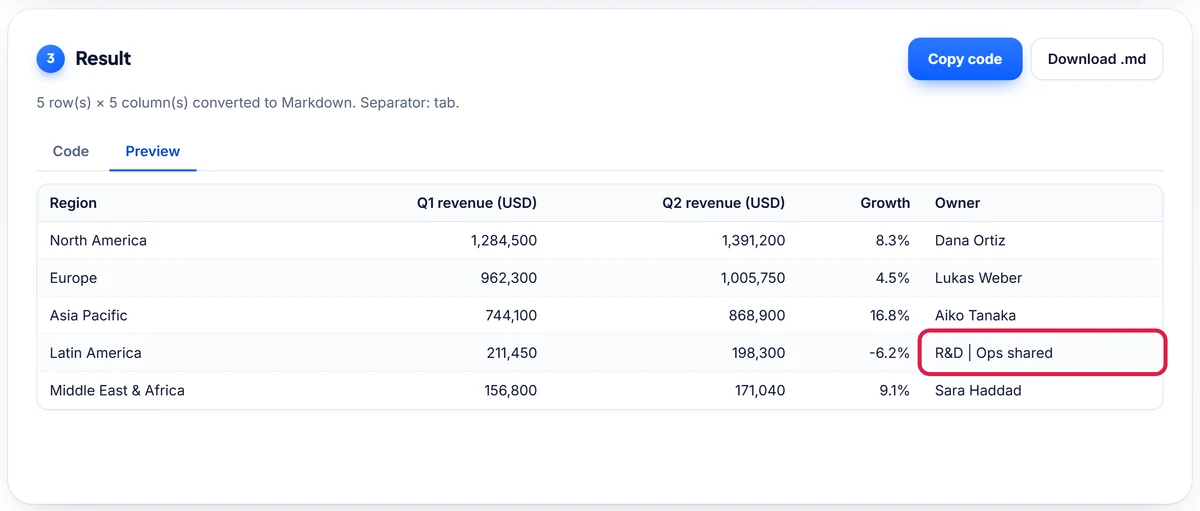
In the Preview tab, look at the cell that was a problem. If it shows as one cell with the expected text, the escape worked. If it still looks wrong, the renderer you will use may handle tables differently from the preview.
Use HTML output when Markdown is not enough
Some tables are too complex for Markdown. A cell with several paragraphs, a table that needs a caption or a table that needs a header section and a body section cannot be written in the simple syntax. For these, pick HTML as the output.
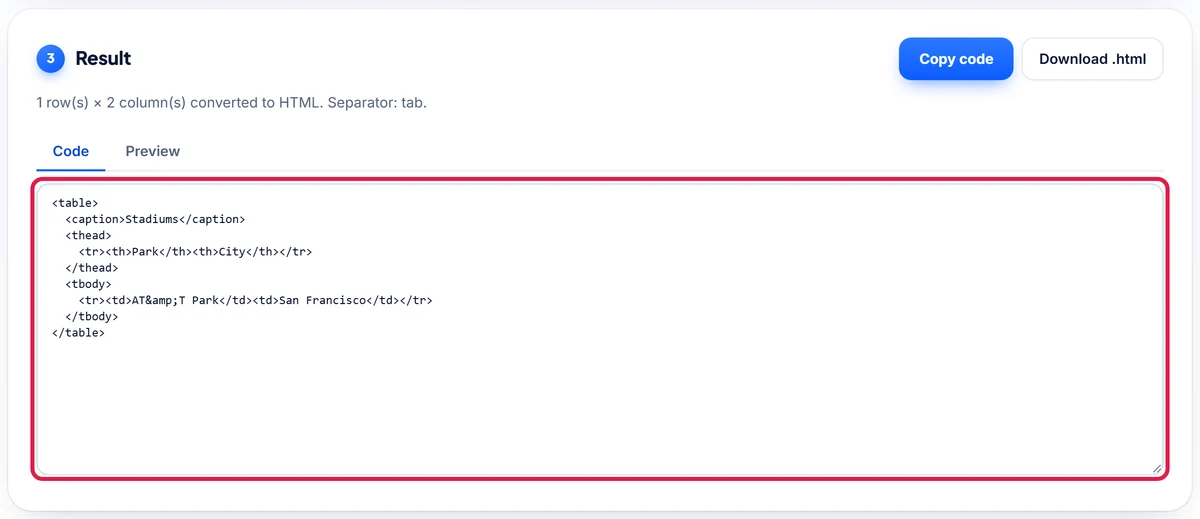
The HTML output writes a table with thead and tbody, right-aligned numbers and a caption if you give one. Special characters are escaped the HTML way. For example, the cell AT&T Park is written as:
<td>AT&T Park</td>
The ampersand becomes &, because a plain & could be read as the start of an entity. Line breaks in cells are written as
here as well.
HTML is allowed in a GitHub README and in many documentation systems, but not everywhere. Check the platform. If it strips HTML, keep to Markdown and shorten the cell text so that it needs no line break.
For a table in a LaTeX document, the escapes are different again: &, %, _ and # need a backslash. See Make a LaTeX Table From Excel With booktabs.
Try it
Open the Excel to Markdown Table Generator, paste the cells from your sheet and pick Markdown. Look at the cells with a pipe or a line break in the Preview tab, copy the table, and switch to HTML if the platform allows it and the table is complex.