Results About You Google: 7 Steps to Hide Your Number and Address
Use the results about you Google tool to request removal of your phone number and address from Search, then clear the sites that still hold them.

Type your own name into Google and scroll. Sooner or later you may hit a page with your home address on it, one you never published and never agreed to.
Google's free Results about you tool can ask Search to hide pages like that. This guide takes about 15 minutes, and it's straight about the part most guides skip: hiding a result doesn't delete the page. I haven't run a request on my own details, so every step below comes from Google's help pages, which I read on 14 October 2026. Your screens may look a little different.
Quick answer: Open Results about you in your Google Account, add your name, phone number, address and email, and turn on alerts. Then choose Request to remove on each match. Google hides approved results from Search only. The page stays online, so you also need to contact the sites that host it.

What do you need before you start?
- Time: about 15 minutes for setup and your first requests. Google's decisions arrive later.
- A Google Account you're signed in to. The Search route below needs it too.
- The details to hunt for: your name, plus a phone number, home address and email. A nickname or maiden name is optional, and Google's help page says you can add more than one phone, address or email.
- Optional, US first: Google's February 2026 post says the tool can also watch for a passport, driver's license or Social Security number, and that it's rolling out in the US first.
- A notes app or a pen to log which sites hold your data. You'll need that list in the second half.
The catch: this hides pages from Google Search and nothing else. Google's own post says removing information from Search "doesn't remove it from the web entirely." Anyone with the link, or another search engine, may still find the page.
How do you use Results about you on Google? 7 steps
These follow Google's help page for the tool. Menu names can change, so go by the labels rather than the layout.
- Open the tool. In the Google app, tap your profile picture, open the menu and pick Results about you. On desktop or mobile web, go to myactivity.google.com/results-about-you.
- Start setup. Select Get started, or Settings if you've been here before.
- Enter your details. Add your name and the phone number, address and email you want checked. Add the extras if you've used a nickname or other numbers.
- Turn on notifications. You can get email alerts or alerts in the Google app. This is what catches new results later.
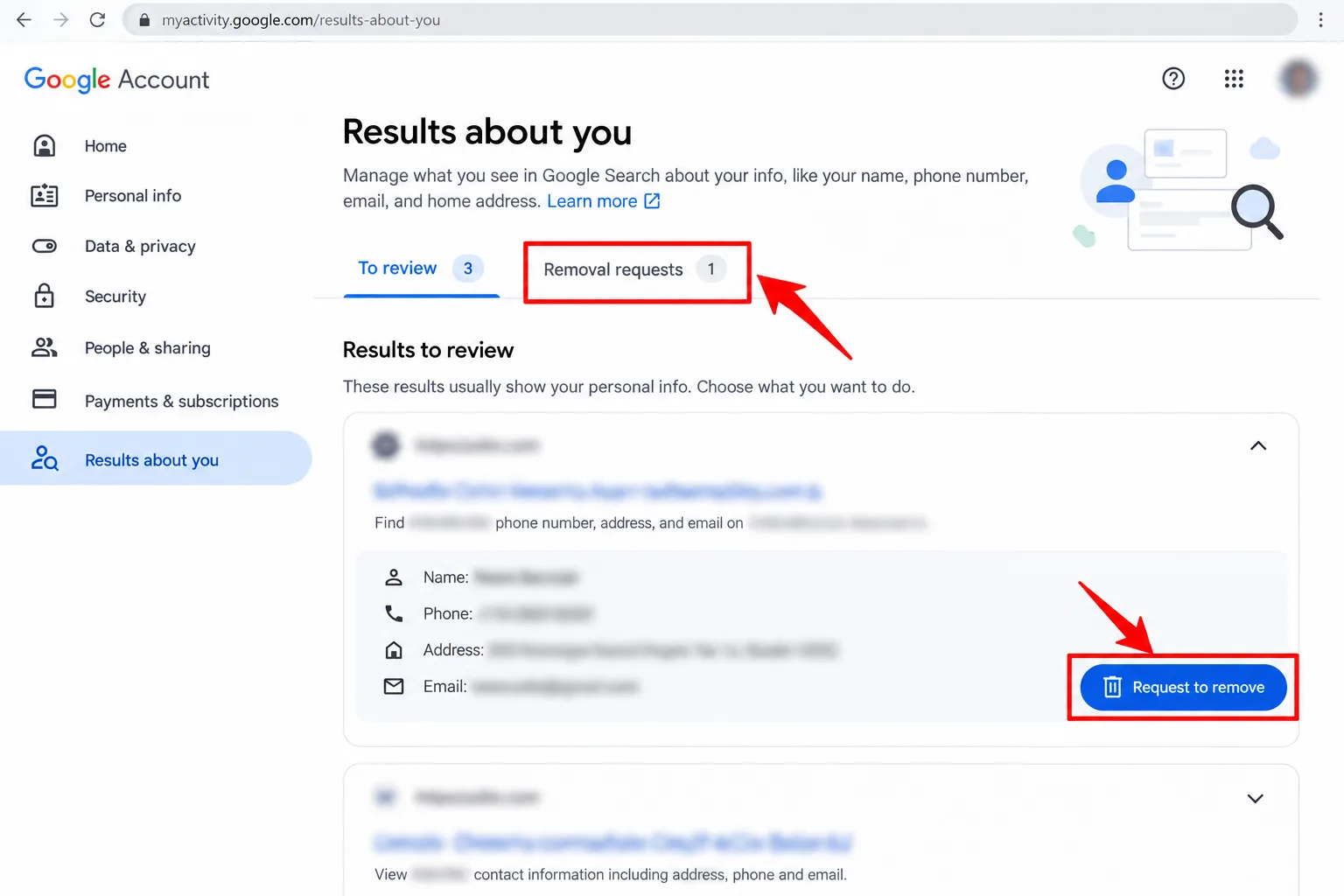
- Review the matches. Google says you'll hear within a few hours whether anything matched. Open the To review tab, then select a result to see the site and the details it shows.
- Request removal. Expand the result and select Request to remove. If a match is harmless, choose Mark as reviewed instead. A confirmation email should follow within a few hours.
- Track the request. Open Removal requests on the same page. Each one shows as In progress, Approved, Denied or Undone, and Google lists the reason for a denial.
What if you find your details in Search first?
You can start from the result itself. This is also the quickest route if you've spotted one bad page and don't want to set up monitoring yet.
- Sign in to Google and search your name, optionally with your city or address.
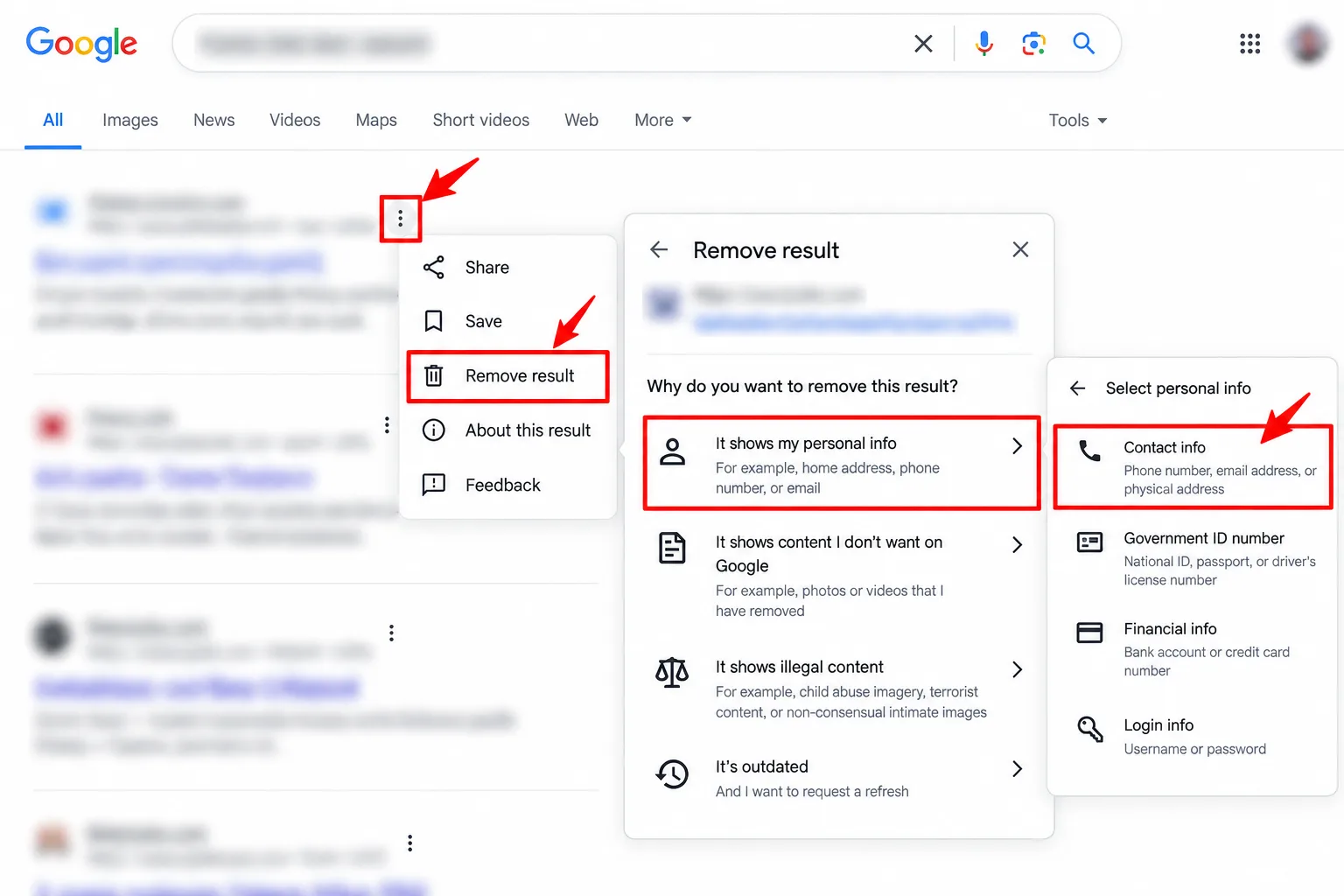
- Next to the result, open More to reach the About this result panel.
- Select Remove result, pick the option for personal info you don't want shown, then choose Contact Info.
- Finish the flow, submit it and select I'm done.
Google's tips: type the info exactly as it appears on the page, use one contact type per request, and don't file twice for the same URL.
What will Google actually remove?
Less than the headline suggests. Google's rules cover contact details like phone numbers, addresses and emails, and its general removal page also lists government ID numbers, bank and card numbers, photos of signatures or ID, medical records and passwords.
- Full or partial. Some approvals only hide a page for searches that contain your name. It can still turn up for other queries, so search your number and address on their own as well.
- Not every site gets a button. Results from government or educational sites, online newspapers and business sites may not show a Remove result option.
- Public-interest pages usually stay. Google says it may keep newsworthy or important content up.
- Things you control don't qualify. If it's on your own blog or social profile, Google expects you to remove it there.
- It isn't instant. Google gives no fixed review time, only that confirmation and first alerts take a few hours.
The catch: approval removes a link, not the page. The data broker, forum or directory that published your number still has it, and Google's pages say people may find it through links, social media or other search engines.
What should you do about the sites that still hold your data?
This is the part that makes the fix last. Many matches will probably be people-search sites, a kind of data broker. The FTC says they compile information from public records, other brokers and public social media profiles. Work through your list from step 5.
- Note the site for each result. Results about you shows which site a match came from. Write the domain down.
- Find its opt-out page. The FTC suggests searching the site for your phone number or address and looking for an opt-out link. If you can't find one, search the site's name plus "opt out."
- Check the site is real first. Any page asking for your details can be a look-alike. Run it through our is this website legit checks before you type anything in.
- Submit the opt-out. The FTC says you may have to share some information to verify who you are, and some sites let you remove an address or number but not other details.
- Edit what you own. A page on your own blog or social profile is yours to change. For anything else, Google says the site owner is the one who can take it down.
- Refresh Google once the page is gone. If Search still shows the old snippet, Google's Refresh Outdated Content tool asks it to update. I read its help page: it works for pages that were removed or changed a lot, and it won't clear details still on a live page.

The catch: opting out isn't permanent. The FTC says your information "could re-appear" if the underlying public records change, and that opting out doesn't delete public records or stop relatives' reports showing your details. It suggests checking the sites periodically.
A rule of mine, not Google's: put a reminder in your calendar every three months, search your name, number and address in quotes, and repeat the opt-outs for anything new. Our Google search operators guide covers the quote trick.
California residents: use DROP
If you live in California, there's a shortcut for brokers. The state's Delete Request and Opt-out Platform lets you send one free request to registered data brokers. From 1 August 2026 they must check it at least once every 45 days, and status updates can take up to 90 days to appear. It only reaches registered brokers, so keep the manual list for the rest.
Which mistakes slow this down?
- Treating "Approved" as "deleted." It means hidden from Search, as the catch above explains.
- Typing details differently from the page. Google says to enter info exactly as it appears.
- Filing for the wrong thing. Content you can remove yourself isn't eligible, and requests for other people generally go through the detailed form. Filing for someone else from your own account may be denied.
- Skipping the source site. That's one way a number comes back.
- Ignoring a denial. The reason is on the page and in the email. Read it before you try again.
- Clicking Undo casually. Google warns the URL may not return to results if you reverse a removal, so only undo on purpose.
What if the request fails?
- Denied: read the reason. Google says public-interest sites such as newspapers, government and educational pages are generally not removed, so the site owner is your next stop.
- No Remove result option: Google's help page says that can happen with those site types. Contact the site owner, the route Google names for taking content off the host.
- Only partly hidden: that's the name-only removal. Search your number and address alone and file again for what still shows.
- It came back: repeat the opt-out at the source and keep alerts on, so a new match reaches you.
- You're under 18, or it's a legal matter: Google says under-18s should use its detailed removal request form, and legal removal requests follow a separate process.
- The exposure comes with threats: contact your local police first. This guide is for routine cleanup.
My take and next step
Results about you is the best free first move, mostly because the alerts do the watching for you. It's a lid, not a delete button. My pick: turn on monitoring tonight, request the three worst matches, then opt out at those sites this weekend. Skip this if: the page sits on something you run yourself, because deleting it there is faster.
Next step: open the tool and add your phone number and address. The same Google Account has other tucked-away controls, and our guide to hidden Google features shows more of them. Free sample forms are one way your address ends up in broker databases, which our privacy-first guide to free samples explains. More tools like this live in the Internet Secrets & AI Tools hub.
Last checked: 14 October 2026, against the Google Search Help, Google blog, Refresh Outdated Content, FTC and CalPrivacy pages named above. Features, regions and dates change, so confirm them on each official page.
Frequently asked questions
Does Results about you work outside the US?
Google says the ID-number feature is US first, and its help page notes some features are rolling out to over-18s in certain markets. I couldn't confirm a current country list, so open the tool in your account and see what it offers.
How long does removal take?
Google gives no fixed timeline. Confirmation and first alerts arrive within a few hours, and its help page says that after approval the removal may lag, so check back later. A denial comes by email, with the reason on the page.
Is it safe to add my ID numbers?
Google says the tool uses its security protocols and encryption, and the setup steps I read ask for contact details first. My own rule: start with those, and add ID numbers only if you're worried about a specific leak.
Quiz
Protect Your Privacy with Google’s Results About You
10 quick questions — think you know this one?
Test Your Knowledge →Comments (9)
- R
Riley
Oct 11, 2026
I’ll be coming back for more useful content.
- J
Jamie
Oct 11, 2026
This was a good use of a few minutes of my day.
- R
Robin
Oct 10, 2026
Very nice work. Keep sharing useful content!
- P
Pat
Oct 7, 2026
I really appreciate the helpful details in this post.
- J
Jamie
Oct 5, 2026
This article gave me a better understanding of the topic.
- C
Casey
Oct 2, 2026
Thanks for the great content. Keep it up!
- L
Lee K.
Oct 1, 2026
The explanation was clear and straight to the point.
- P
Pat
Sep 29, 2026
The article is clear, informative, and easy to follow.
- S
Sam
Sep 28, 2026
Well done! I hope to see more articles like this.