Gemini in Chrome: 7 Things to Try, and What Costs Extra
Gemini in Chrome explained: seven features to try, which ones list no paid plan, and which need Google AI Pro or Ultra. Check your setup first.

There's a small button at the top of your browser window that you've probably clicked past for months. It's Gemini in Chrome, and it can read the page you're on, compare up to ten tabs and edit an image without leaving the tab.
Most of it doesn't ask for a subscription. The flashy part, auto browse (Gemini clicking through websites for you), does. This guide gives you the setup steps, seven things to try with a free-or-paid label on each, and the fixes for when the button won't show up. I read Google's own help pages and announcements for this, and every label below comes from them. I haven't run these features myself for this piece.
Quick answer: Gemini in Chrome is the Gemini assistant built into the browser. Sign in to Chrome, click Ask Gemini at the top of the window, and ask about the page you're on. Chatting, tab comparisons and image edits list no paid plan. Auto browse needs Google AI Pro or Ultra, in the US.

What do you need before you start?
Time: about five minutes. Cost: nothing for the basics. Here's what Google's Chrome help page asks for on a computer:
- A Windows, Mac or Chromebook Plus computer. Linux isn't on the list.
- The latest version of Chrome, signed in to your Google Account. It doesn't work in Incognito.
- Age 13 or older (or the age your country sets), in a supported region, with your device set to a supported language.
- For a work or school account, your administrator has to switch it on.
The catch: Google says it's rolling Gemini in Chrome out gradually, so it may not appear for you yet. Availability also changes by country, device and plan. The official auto browse help page and the regions list it links to are where to confirm your own situation.
How do you use Gemini in Chrome? Five steps
- Update Chrome and make sure you're signed in (not in Incognito).
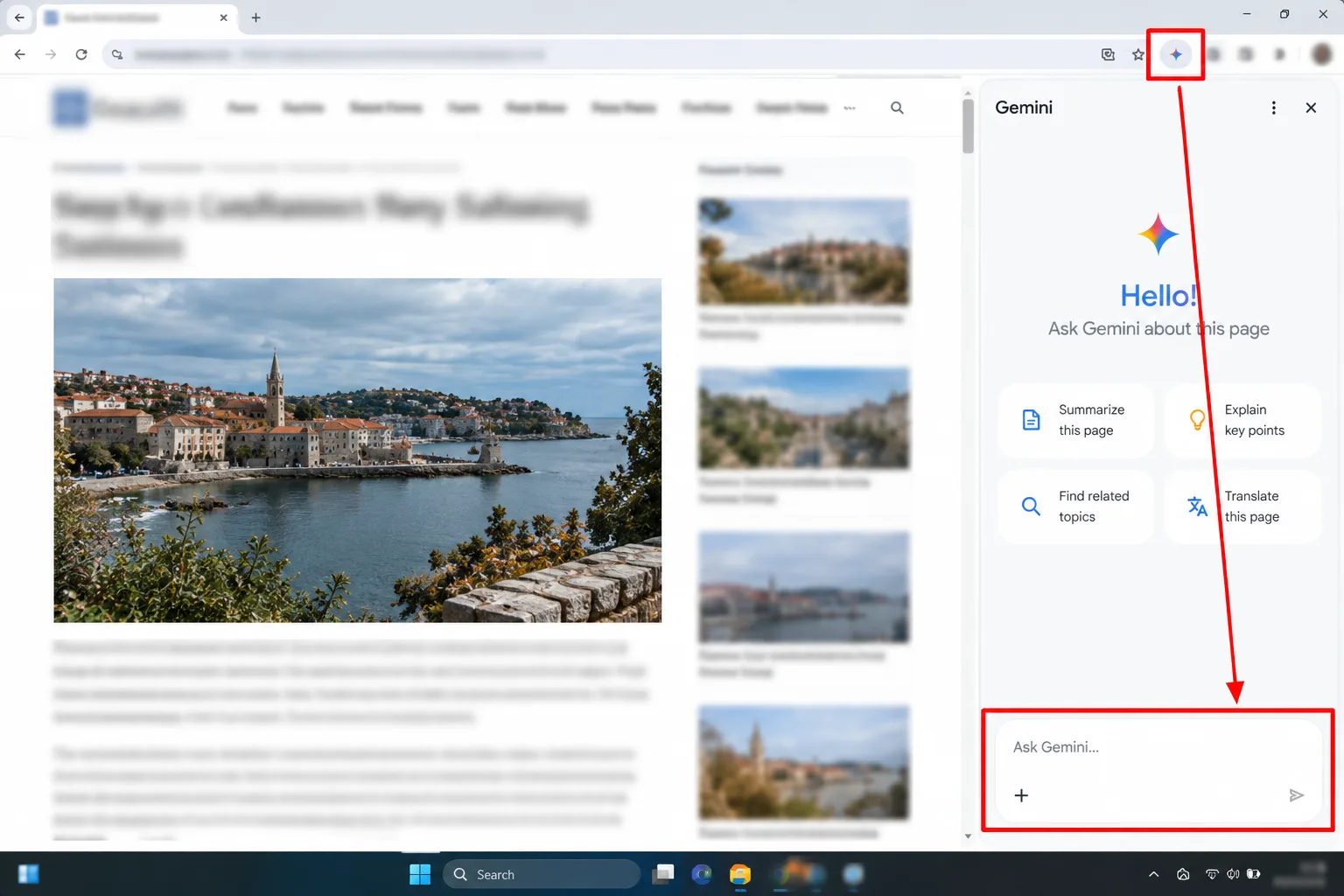
- At the top of the browser window, click Ask Gemini.
- The first time, follow the onscreen prompts to opt in.
- Type a question or request in the text box. By default Gemini uses the tab you're looking at.
- Look for a glowing underline on a tab. That means Gemini is reading it.
After you opt in, Gemini also appears in the Mac menu bar or the Windows system tray, with a keyboard shortcut. The chat is a side panel that you can pop out into a floating window or dock back to the tab.
Which 7 Gemini in Chrome features are worth trying?
The labels below mean this: No paid plan listed says Google's requirements page for that feature names no subscription. Paid says it does. Google can change either, so recheck before you rely on one.
1. Chat with the page you're on
- Label: no paid plan listed.
- Try: open a long article and ask for the key takeaways, or ask Gemini to explain a dense paragraph in plainer words.
- My pick: start here. A terms-of-service page or a 4,000-word explainer is where it saves the most time.
2. Compare up to 10 tabs
- Label: no paid plan listed. Desktop only.
- Try: open three product pages, click Add tabs in the text box (or type @ and pick a tab), then ask which suits a specific budget.
- The catch: check each spec against the product page before you buy. A summary can drop a detail.
3. Ask about a video or podcast you've played
- Label: no paid plan listed.
- Try: after you've watched a video, ask for a summary or a specific detail you forgot.
- The catch: it only covers audio and video you've already played. The setting is on by default, and you can toggle "Media understanding" at chrome://settings/ai/gemini.
4. Edit or make images with Nano Banana
- Label: Google's announcement said it's available to all Gemini in Chrome users.
- Try: ask it to show a room from a furniture listing with different furniture, or to turn a page of figures into an infographic.
- Skip this if: you need exact, publishable charts. Check every number it draws.
5. Save prompts as Skills
- Label: no paid plan listed. Google announced it on April 14, 2026, rolling out on Mac, Windows and ChromeOS for Chrome set to English-US.
- Try: after a prompt you like, save it from your chat history as a Skill. Next time, type / or click the plus button to run it on the current page.
- Good to know: Skills ask for confirmation before certain actions, such as adding a calendar event or sending an email.
6. Talk to it with Gemini Live
- Label: no paid plan listed. Not available to users under 18.
- Try: click Live at the bottom of the panel and ask questions out loud while you read or cook from a recipe page.
- The catch: it needs microphone permission. You can switch that off in Chrome's Gemini settings.
7. Hand a chore to auto browse
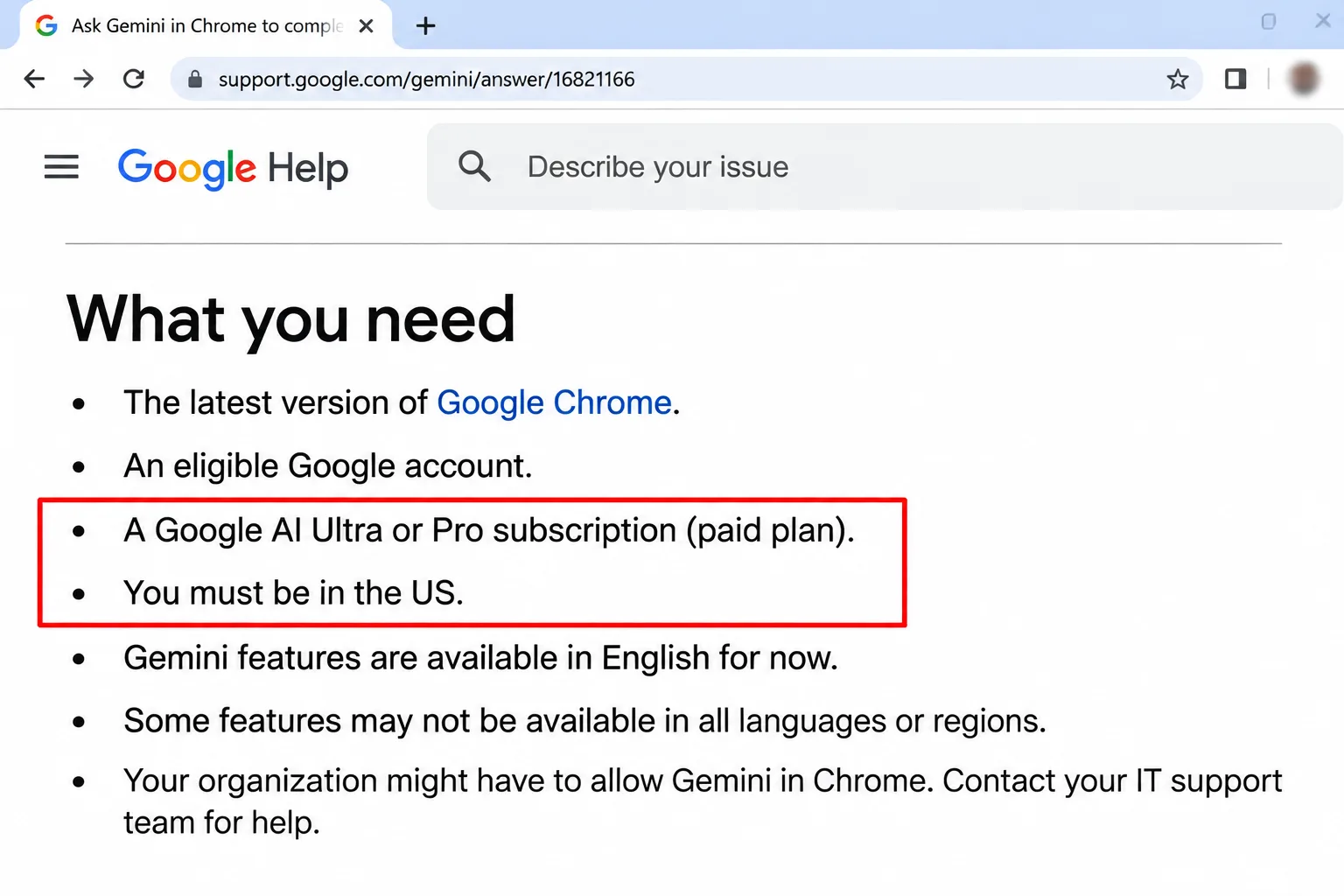
- Label: paid. Google AI Pro or Ultra.
- Try: something dull and checkable, like comparing hotel prices across three date ranges and listing the results.
- The catch: see the next section. The list of requirements is long.
What does auto browse cost, and who can use it?
On Google's Chrome AI page, auto browse is listed as available to Google AI Pro and Ultra subscribers in the US. The help page adds the fine print. For a computer, you need to be 18 or over and in the US. Your device language has to be English, and you need a personal Google Account, not a school one. Chrome's Safe Browsing must be on Standard or Enhanced.
Expect a daily cap. Google's help page lists up to 20 multi-step task requests a day on Pro and up to 200 on Ultra. I'm not quoting subscription prices because they vary and change. Check the plan page before you pay.
Phones: Google announced on August 18, 2026 that Gemini in Chrome had reached all Android users in the US, with auto browse for Pro and Ultra subscribers there. Google's help page says auto browse isn't available in Gemini in Chrome on iPhone or iPad. Chrome's AI page says Gemini is built into the Chrome app on iOS, but with the usual caveats about devices, countries and languages.
The auto browse steps
- Click Ask Gemini and describe the task.
- Click Submit, then read the plan Gemini shows. Check it understood the task and your details.
- Click Start Task. The tab Gemini is using gets an auto browse icon.
- Confirm any sensitive step when asked, or click Take over task to finish a step yourself.
- Click Stop in the panel, or close the task tab, if it goes off track.
The catch: Google calls the agent feature experimental, and the plan screen warns that it may share your personal details with the sites it picks. Google's help page also describes Gemini Spark using auto browse through your own Chrome. On that route it sees the same sites you do, including ones you're signed in to, and you need to keep your device and Chrome awake. Start with low-stakes jobs.
What mistakes trip people up?
- Forgetting a tab is shared. A new chat shares your current tab by default. If you open it on your bank page, you've shared your bank page. Turn off "Share current tab by default" in Settings, then AI innovations, then Gemini in Chrome.
- Expecting auto browse on the free tier. It isn't there. You'll see it only if your plan, country, language and account type all qualify.
- Using a work or school account. Your admin has to enable it, and auto browse won't run on a school account at all.
- Trusting a summary blindly. Treat it as a first pass and read the source for anything involving money, health or legal deadlines.
- Not noticing the privacy settings. Chats can be saved to your Gemini activity if Keep Activity is on. More in the FAQ.
What if Gemini in Chrome doesn't show up?
Work down this list, which follows Google's own troubleshooting steps:
- Check you're signed in to Chrome and not in Incognito.
- Confirm your country is on Google's supported list. Restart Chrome, and turn off any VPN.
- Check your device language is supported, then update Chrome.
- Right-click the Gemini panel or floating chat box and choose Reload.
- Using a virtual machine or a managed work laptop? Both can block it.
- If nothing works, wait for the next Chrome update. Google says gradual rollout is normal.
To hide the button instead, go to Settings, then AI innovations, then Gemini in Chrome, and turn off "Show Gemini at the top of the browser". Right-clicking the toolbar and choosing Unpin Gemini also works.

My take and next step
My pick: use Gemini in Chrome for the free basics first: page chat, tab comparison and Skills. They cover most of the everyday value. Only consider Google AI Pro for auto browse if you're in the US and have a chore you'd really hand off, because the plan is a monthly bill, not a trial.
The next step takes thirty seconds. Open a long article, click Ask Gemini and ask for three takeaways. If you like it, browse more hidden Google features. If you'd rather stay on the free side of things, our free AI tools roundup covers the alternatives. For study sources, the free NotebookLM guide pairs well with this, and the AI tools hub has the rest.
Last checked: October 2026, against Google's Chrome help pages and announcements.
Frequently asked questions
Does turning off Keep Activity stop Google seeing my Gemini chats?
Not entirely. Google's Gemini privacy page says that with Keep Activity off, chats are still kept for 72 hours to respond to you and for safety, and reviewers may see them. Page content from Chrome is logged temporarily, not to your visible activity.
Can I use Gemini in Chrome outside the US, including in the UK?
Possibly for the basics, depending on your region and language. Google publishes a supported-regions list in its help centre, so confirm there. Auto browse is a separate story: Google describes it as US-only for now.
Can parents switch it off for a teenager?
Yes. Google says parents who keep supervision for a child aged 13 or older can turn off the child's access to Gemini in Chrome through Family Link. Under-18 users also can't use auto browse or Live.
Does it work on phones?
Yes, with limits. Google says Android in the US has Gemini in Chrome for everyone, with auto browse for Pro and Ultra. On iPhone it's built into the Chrome app, but auto browse isn't offered there.
Quiz
Gemini in Chrome: How Much Do You Know?
10 quick questions — think you know this one?
Test Your Knowledge →Comments (6)

Oya Ekşioğlu
5 days ago
This is the kind of content that makes a website worth following.

Faith Carter
5 days ago
Thanks for the great content. Keep it up!

Kate Reid
6 days ago
I found some great tips here. Thanks!

Kerttu Lehto
6 days ago
Great effort from the writer. Thank you!

Kendra Nolet
6 days ago
Great article! I really enjoyed reading this.

Enrico Perez
Oct 10, 2026
Thanks for sharing this helpful information!