Free AI Tools: 9 That Feel Paid, and Where Free Ends
Nine free AI tools for research, design, slides, coding and voice, with the exact free-plan limits so you know where free ends before you commit.

The first time a free AI tool does the job you'd budgeted to pay for, it feels like finding a loophole. The second time, you hit a wall: 20 uses, 10 slides, a banner asking for your card.
These nine free AI tools cover research, design, slides, coding, voice and everyday writing, and each entry says exactly where free ends. I checked every official pricing or plan page on October 11, 2026. I'm reporting what those pages promise, not benchmarking output quality.
Quick answer: The best free AI tools right now are Gemini for general help and research, Canva for design, Gamma for slides, GitHub Copilot for coding and ElevenLabs for voice. All have a $0 plan, but each caps usage or withholds something, so check the limits on every pricing page before you build on one.

Which free AI tools are actually worth your time?
I've ordered these by how much real work the free plan covers, with the two broadest first. Prices are US figures at the time of writing.
1. Gemini
Verdict: The widest free toolkit if you already live in a Google account.
What it is: Google's AI assistant. Google's plans page lists image generation and editing, Deep Research, Gemini Live, Canvas and Gems on the free tier, which runs a lighter Flash-Lite model.
How to start: Sign in with a Google Account in the Gemini app or on the web.
Where free ends: Google AI Plus is $4.99 a month for 2x the free usage and access to stronger models. Pro is $19.99 for 4x. Video generation and Daily Brief sit behind paid plans.
The catch: Limits are compute-based, so a long chat or a complex prompt burns more. Per Google, they refresh every five hours until you reach a weekly cap.
Best for: Everyday questions, research and quick images.
2. Canva
Verdict: A genuinely free design tool where the AI is the rationed part.
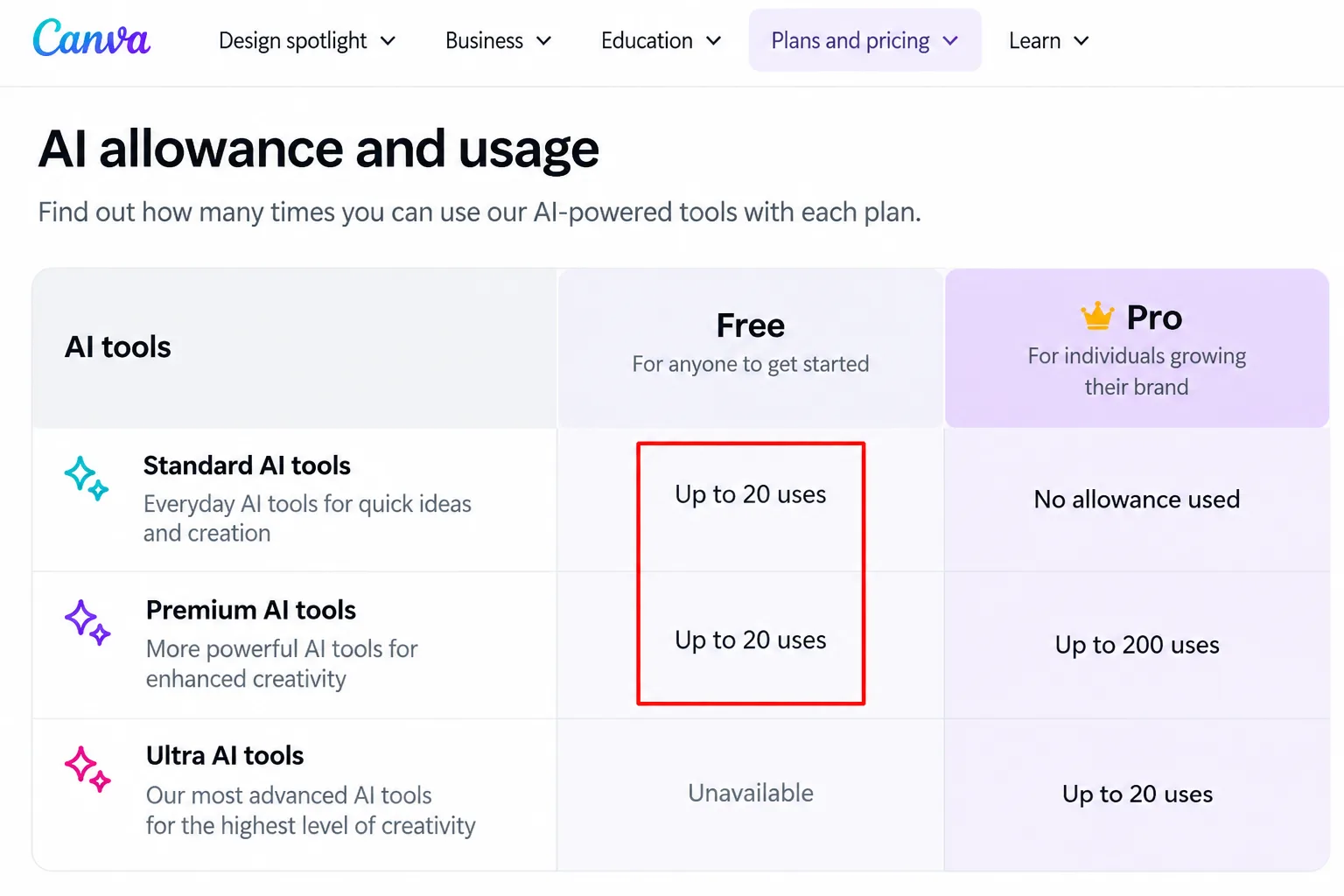
What it is: A drag-and-drop editor for posts, flyers and decks. Canva's pricing page says Free includes AI design and element generation and Magic Layers.
How to start: Sign up free, open a design and look for the Canva AI options in the editor.
Where free ends: Free gets a shared monthly AI allowance of up to 20 uses of Standard or Premium tools. Ultra AI, such as design through conversation and AI video, isn't included, and neither is background removal. Pro lists at $144 a year.
The catch: Canva's own estimate assumes simple tasks. Complex ones use more of the allowance.
Best for: Social posts and flyers where a handful of AI edits is enough.
3. NotebookLM (now Gemini Notebook)
Verdict: A research assistant that works from the sources you give it.
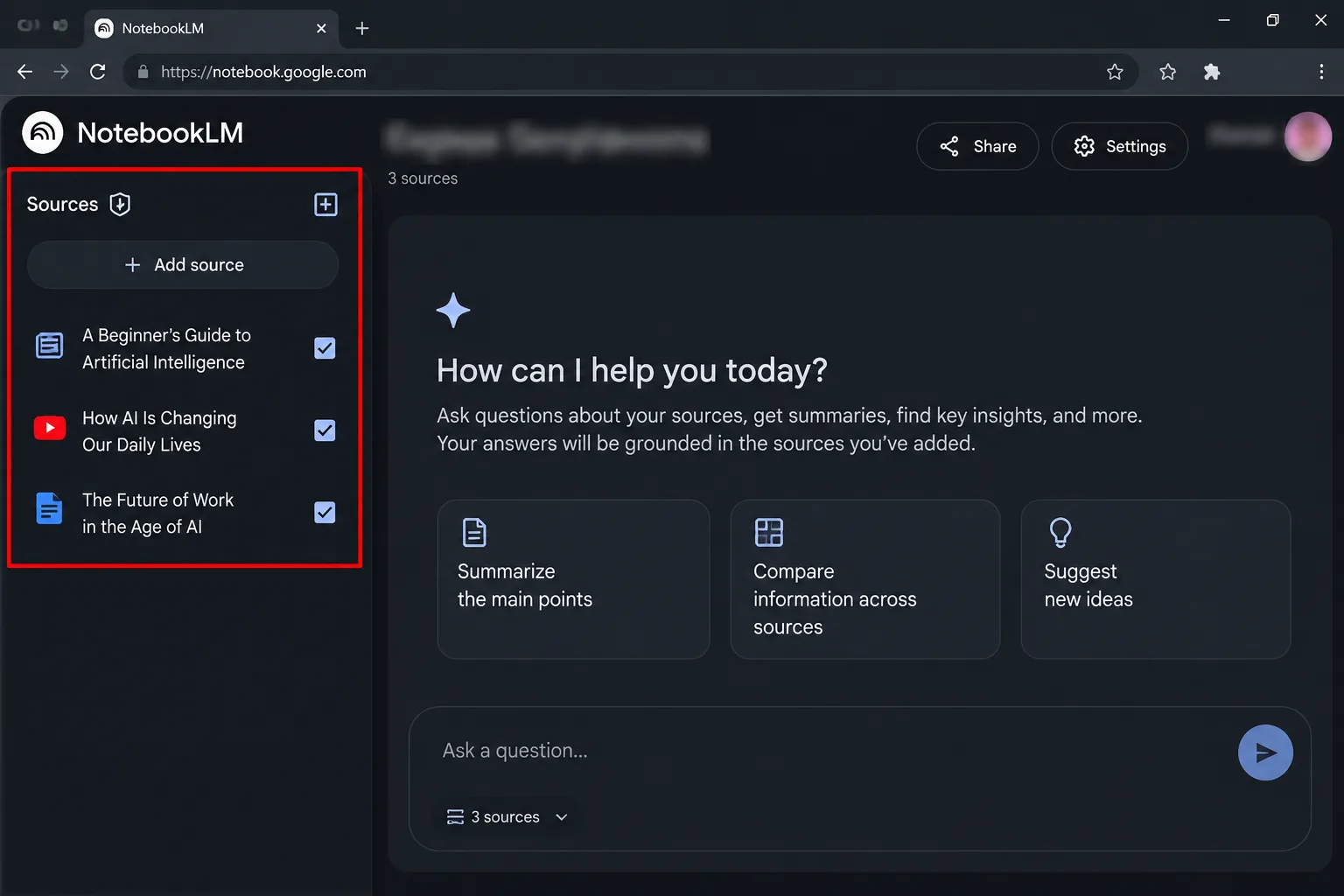
What it is: Google's site now calls it Gemini Notebook and describes an AI research tool that analyses your own sources. Its plans page also lists Audio Overviews.
How to start: Go to notebook.google, sign in, create a notebook and add your sources. Our NotebookLM guide covers turning a PDF into audio.
Where free ends: Google's page gives no free caps. It does say Pro adds 5x more Audio Overviews and notebooks, so the free tier is smaller. Check the limits inside the app.
The catch: Answers are only as good as your sources, so check anything important against the original.
Best for: Study notes, long PDFs and report prep.
4. Gamma
Verdict: Prompt-to-deck in minutes, with branding you can't drop for free.
What it is: An AI builder for presentations, docs and simple sites. Gamma's pricing page says the free plan needs no credit card and exports to PDF, PPTX, PNG and Google Slides.
How to start: Sign up, type a prompt, edit the draft, then export.
Where free ends: Free creates up to 10 slides per prompt. Plus raises that to 100 and removes Gamma branding. Custom branding, analytics and API access start at Pro.
The catch: The page also mentions AI credits, but I couldn't see the free allowance. Check your account before a deadline.
Best for: Pitches and class talks of ten slides or fewer.

5. GitHub Copilot Free
Verdict: Real coding help in your editor, on a meter.
What it is: GitHub's plans page shows the free plan working in editors, the command line and GitHub itself, with agent mode included.
How to start: Choose Free on GitHub's Copilot plans page, sign in, then install the extension in your editor.
Where free ends: Free gets 2,000 inline suggestions a month, and chat and agent use is limited. Code review and the cloud agent need Pro, listed at $10 a month.
The catch: GitHub says Free interactions may be used to train its models unless you opt out in settings. One FAQ line on that page still says 50 chat requests, while the plan table says "limited," so trust your usage meter.
Best for: Students and hobby coders.
6. ElevenLabs
Verdict: Natural-sounding voices for drafts, not for anything you sell.
What it is: A voice platform. ElevenLabs' pricing page lists text to speech, speech to text, sound effects, Voice Design and music on the free plan.
How to start: Sign up, paste text into Text to Speech, pick a voice and download the audio.
Where free ends: Free gives 10,000 credits a month, roughly 10 minutes of speech by the page's table. A commercial license and instant voice cloning start at Starter. Professional cloning starts at Creator.
The catch: Don't put free-plan audio into monetised videos or products until you've read the terms.
Best for: Voiceover drafts, accessibility and quick demos.

7. Ideogram
Verdict: A free image generator that keeps your pictures public.
What it is: An AI image generator with an app suite that includes a background remover and object remover.
How to start: Sign in with a Google, Apple or Microsoft account. Per its pricing page, eligible free accounts get weekly credits, and the amount may vary.
Where free ends: Free means slow credits and one generation running or queued at a time. Priority credits, private generation and quality export start at Plus, listed at $20 a month ($15 on annual billing).
The catch: Images are published to the community by default, and only Plus and Pro can generate unpublished ones. AI editing and image reference need priority credits, which free accounts don't get.
Best for: Concept art and social graphics you don't mind sharing.
8. ChatGPT Free
Verdict: Unlimited text chat, with everything else rationed.
What it is: OpenAI's pricing page lists unlimited text chats with GPT-6 on Free, subject to abuse guardrails, plus search, projects, voice and study mode.
How to start: Sign up free on web or mobile.
Where free ends: Uploads, image creation, voice, deep research and memory are all "limited." The default model's input cap is about 12 pages of text, against about 40 on Go and Plus. Scheduled tasks and the most capable models are paid.
The catch: Your content may train OpenAI's models unless you use the opt-out.
Best for: Drafting, brainstorming and everyday questions.
9. Claude Free
Verdict: A chat assistant whose free plan also builds slides, docs and designs.
What it is: Anthropic's pricing page lists web search, file creation, code running, memory, connectors and Artifacts on Free, along with Claude Design, Slides and Docs.
How to start: Sign up at claude.ai.
Where free ends: Free covers Sonnet and Haiku models, not Opus. Research and Claude Code are Pro features, and Projects are capped at five. Pro is $17 a month billed annually, or $20 monthly, with at least 5x more usage.
The catch: Limits reset on a rolling five-hour window with no fixed message count, and model training is opt-out.
Best for: Writing and document work.
Choose the right free AI tool for the job
Choose Gemini or ChatGPT if you want one general assistant for writing and questions.
Choose Canva or Ideogram if you need a free AI image generator, and pick Canva if privacy matters.
Choose Gamma if your deck runs ten slides or fewer.
Choose NotebookLM if you're working from your own PDFs and notes.
Choose GitHub Copilot Free if you code in an editor.
Choose ElevenLabs for voice drafts, and upgrade before commercial use.
Which free AI tools can students and teachers use?
Several vendors go beyond the standard free plan, but each has eligibility rules. Confirm yours on the official page first.
Canva says K-12 educators, their students and qualified school districts can use Canva Education, and higher education has a separate Campus offer.
Google's plans page carries a banner saying college students get a free Pro plan for one year.
OpenAI lists ChatGPT for Teachers as free for verified US K-12 educators through June 2027.
My take and next step
My pick: Gemini plus Canva. Together they cover writing, research, images and design on $0 plans. The caps are the catch, so I wouldn't run a business on either free tier. Skip this approach if you need commercial voice or private images, because those tend to start at a paid tier.
Next step: pick one job, use one tool for a week and watch its usage meter before paying anyone. For more, see our free AI tools to replace paid apps, the guide to free alternatives to paid software, and the rest of the Internet Secrets & AI Tools hub.
Last checked: official plan pages opened on October 11, 2026. Free limits change often, so confirm them on each page before you build on a tool.
Frequently asked questions
Do free AI tools use my data to train their models?
It depends on the tool. GitHub says Copilot Free interactions may be used for training unless you opt out, and ChatGPT and Claude both list an opt-out. Ideogram publishes free-account images by default. Check each privacy setting before you paste anything sensitive.
Can I use free-plan output commercially?
Not always. ElevenLabs lists a commercial license starting at Starter, while Ideogram says you're free to use generated images for any purpose, commercial included. Terms differ and change, so read them before you sell anything. This isn't legal advice.
What happens when I hit a free limit?
Usually you wait. Gemini and Claude limits refresh on a five-hour basis, with weekly caps on top for Gemini, while Canva's AI allowance resets monthly and ElevenLabs credits come monthly. Paying is optional, and a lighter model or a different tool often stretches your day.
Quiz
10 Free AI Tools You Should Know About
10 quick questions — think you know this one?
Test Your Knowledge →Comments (9)

Niilo Laitinen
5 days ago
I appreciate the clear writing and useful information.

Victoria Denys
6 days ago
Great article with information that actually helps.

Anton Kotila
6 days ago
I like the way this article gets straight to the point.

Vildan Balaban
Oct 8, 2026
Great work by the author. Looking forward to more!

Samuel Evans
Oct 5, 2026
Great read, and I look forward to more content from Perktonic.

Ivy Kumar
Sep 26, 2026
Great information presented in a simple way.

Mark-Jan Mathot
Sep 23, 2026
This was surprisingly helpful. Thanks a lot!
Erica Hartig
Sep 15, 2026
Thanks to the writer for putting this together.

Owen Rivera
Sep 13, 2026
I’ll be coming back for more useful content.