
Run a Cron Job on the Last Day of the Month
How to run a cron job on the last day of the month: why standard cron cannot, the Quartz L symbol, the expression 0 0 23 L * ?, and schedules that never run.

Months have 28, 29, 30 or 31 days, so a month-end job cannot be written with a fixed day number. Standard cron has no word for the last day of the month. For cron on the last day of the month, use an expression format that has one: Quartz does, with the letter L. The Cron Expression Generator can write the Quartz expression and show the next runs, so you see that it lands on the right days.
Standard cron versus Quartz
Standard cron, as used in a crontab on Linux, has five fields: minute, hour, day of the month, month and day of the week. The day-of-month field takes numbers from 1 to 31, lists, ranges and steps. It has no symbol for "the last day". If you write 31, the job skips months with 30 days or fewer.
Quartz is a scheduler for Java, and its cron format is different. It has six or seven fields, and the first one is seconds: seconds, minutes, hours, day of the month, month, day of the week and an optional year. It also has extra symbols. L in the day-of-month field means the last day of the month, whatever its length.
A Quartz expression is not valid in a Linux crontab, and the reverse is true as well. Check which format your scheduler expects before you copy anything. The Cron dialect menu of the generator switches between the formats and shows the matching field names.
Worked example: 0 0 23 L * ?
For a job at 23:00 on the last day of every month, the Quartz expression is:
0 0 23 L * ?
Read the fields from left to right:
- 0: seconds, at the start of the minute.
- 0: minutes.
- 23: hours, 11 in the evening.
- L: the last day of the month.
- *: every month.
- ?: no specific value for the day of the week.
The question mark is a Quartz detail. The day-of-month and the day-of-week fields cannot both have a value. When you use one of them, you write ? in the other, which means "no specific value". Here the day of the month is set to L, so the day of the week is a question mark.
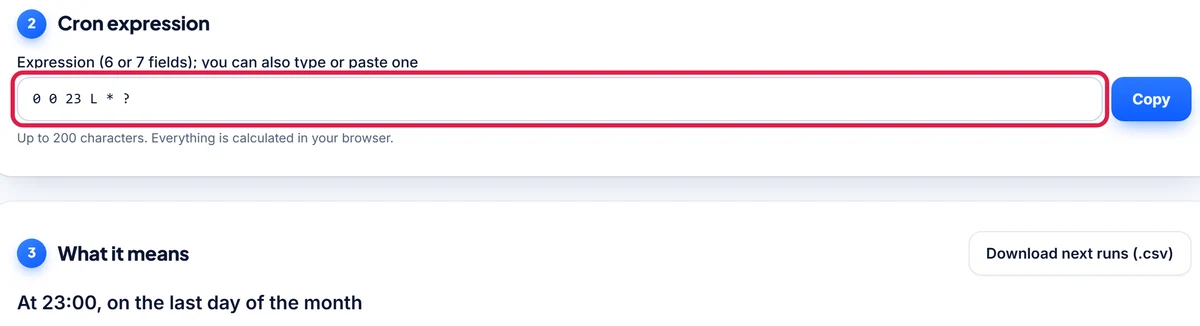
In the generator, choose Quartz as the format and describe the schedule, for example on the last day of the month at 23:00. It writes 0 0 23 L * ? and explains it in words.
If your scheduler is standard cron, there is a common workaround. Run the job every day at 23:00 and let the script test whether the next day is the first of the month. In a crontab, the percent sign must be escaped with a backslash. The check can be written as: run if the output of date -d tomorrow +%d is 01. This uses GNU date, so check that your system has it. The test keeps the schedule simple and moves the logic into the command.
The Quartz format and its symbols are described in the CronTrigger tutorial of the Quartz Scheduler documentation.
Expressions that never run
A cron expression can be valid and still never run. The usual cause is a day that does not exist in the month that is named.
A well-known case is 0 0 30 2 *. It says: at midnight on day 30 of month 2, which is February. February never has 30 days, so the job never runs. The expression is syntactically correct, and nothing reports an error, so the problem can stay hidden for months.
The generator catches this. When you paste such an expression, it explains it as "At 00:00, on day 30 of the month, only in February" and adds "Next 0 runs: This schedule has no runs in the next 100 years", instead of showing a list of runs.
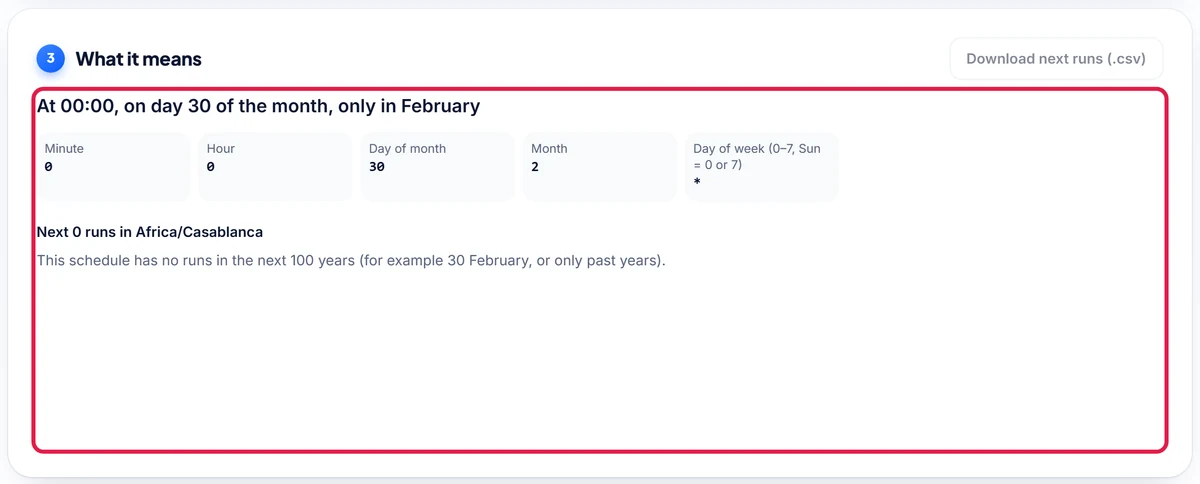
The same applies to day 31 in a month with 30 days: 0 0 31 4 * would run only in months that have a day 31 and are also April, which means never. A job for the 31st that is meant for every month with a 31st day should use the month field to list those months, or use L for the last day.
Check the next runs
The best check of any month-end expression is the list of next runs. The generator lists them. For 0 0 23 L * ?, the runs fall on the last days of the months: 30 November, 31 December, 31 January, and so on. Look at the dates and check that each one is really the last day of its month. February is the test: the run must be on the 28th, or on the 29th in a leap year.
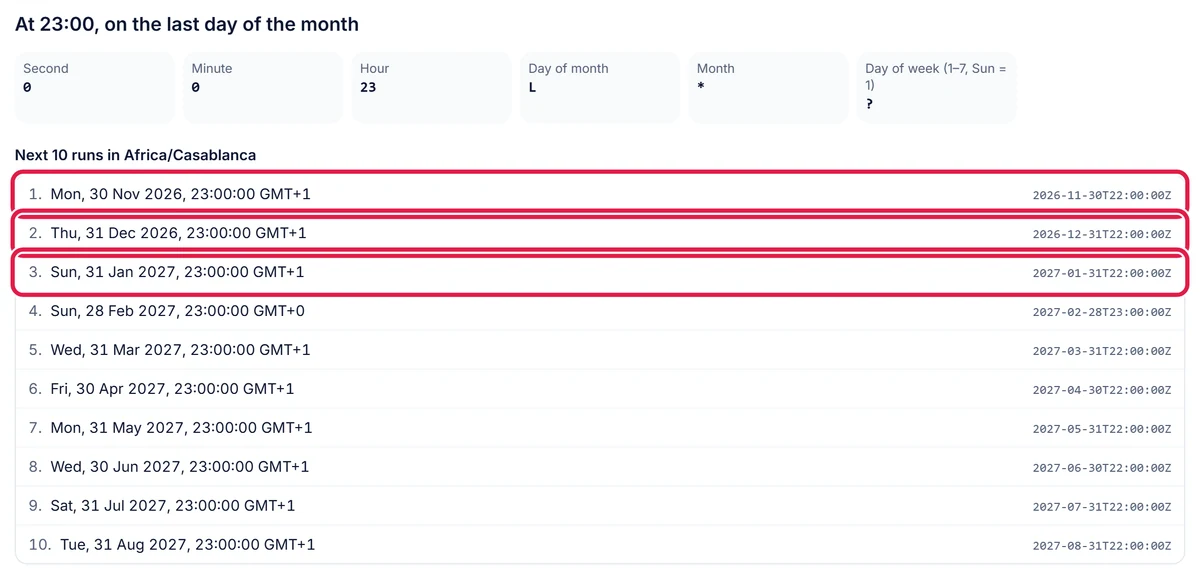
Check also the time zone. A job at 23:00 in one zone can be on the first day of the next month in another. The generator shows the runs in the zone that you choose, with the UTC equivalent, as in Cron Expression for Every Weekday at 9:30.
Try it
Open the Cron Expression Generator, choose Quartz and describe the job as the last day of the month at 23:00. Check that the expression is 0 0 23 L * ?, read the next runs for the dates, and test an expression like 0 0 30 2 * to see the message that it never runs.