
Fix an Incomplete Certificate Chain
Incomplete certificate chain: why a site works in a desktop browser but fails in apps and API clients, how to read the chain in the SSL Certificate Checker and how to install the full chain.
A site that opens without a warning in your desktop browser, while a mobile app, an older Android phone or an API client refuses to connect, often has an incomplete certificate chain. The server sends its own certificate but not the intermediate certificate that links it to a trusted root. The SSL Certificate Checker reads the chain that the server really sends, and tells you when it is incomplete.
What an incomplete chain is
A certificate is trusted because it was signed by a certificate authority. In practice, the authority does not sign your certificate with its root key. It uses an intermediate certificate, which is signed by the root. A client trusts a certificate when it can follow the chain from the certificate through the intermediate to a root that it already knows.
The server has to send the certificate and the intermediate. The root is not sent, because every client has its own list of roots. If the server sends only its own certificate and leaves out the intermediate, the chain has a gap, and a client cannot connect the certificate to a root.
For a site on Let's Encrypt, the chain should be the certificate, then the intermediate certificates of Let's Encrypt, and then the root ISRG Root X1. On 6 November 2026 the checker listed for perktonic.com the server certificate, the intermediates YE1, Root YE and ISRG Root X2, and the root ISRG Root X1. The certificate authority explains this structure in its documentation on the chain of trust.
Why browsers hide the problem
The strange part is that the site seems to work. Many desktop browsers repair the gap themselves. They notice the missing intermediate, find out from the certificate where it can be downloaded, and fetch it. Some also keep intermediates that they have seen on other sites.
Other clients do not do this. Mobile apps, older Android phones and API clients such as scripts, libraries and server-to-server calls refuse the connection. They use only what the server sends, and the gap is fatal for them.
This produces the typical report: "it works for me". The person who tests in a desktop browser sees a working site, and the customers with a phone app or the partner with an API integration see an error. Test with a tool that does not repair the chain, and the problem becomes visible.
Read the chain in the checker
Enter the domain in the SSL Certificate Checker and press Check. The checker looks at the chain as the server sends it. If a link is missing, the countdown block says "The chain is incomplete." and the list of checks has a Problem: "The server does not send its intermediate certificate. Some browsers fetch it themselves, but many apps, older phones and API clients fail. Install the full chain (often called fullchain.pem)." The site incomplete-chain.badssl.com, a test site that does this on purpose, shows it, and the Certificate chain section of that result lists only the server certificate, with no intermediate.
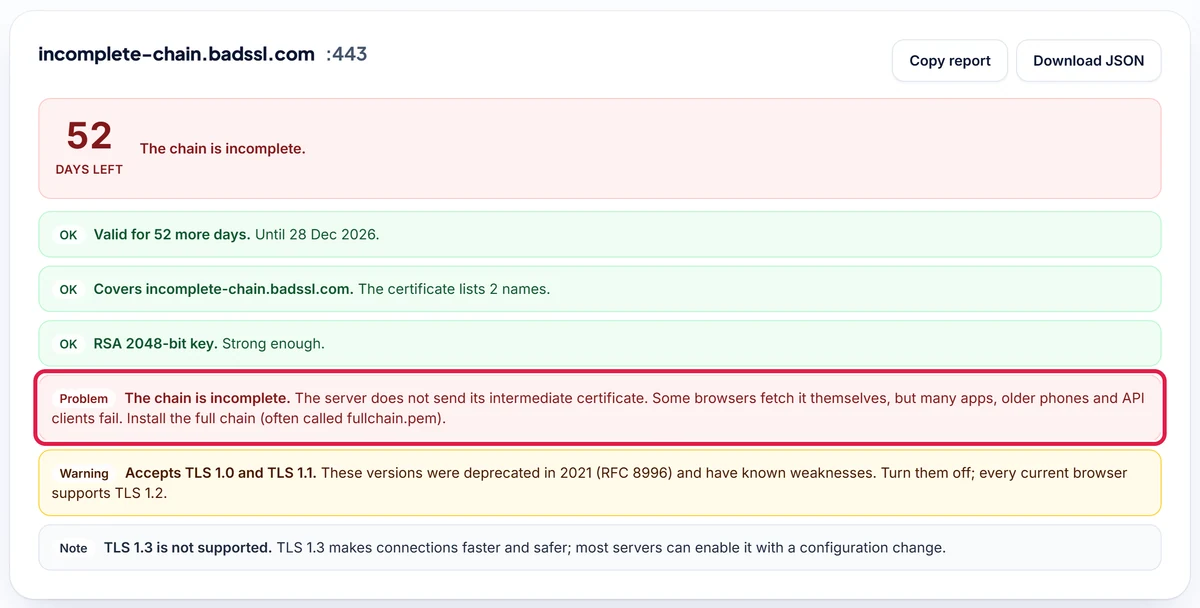
For a healthy server, the chain list shows the certificate and the intermediates, in the right order.
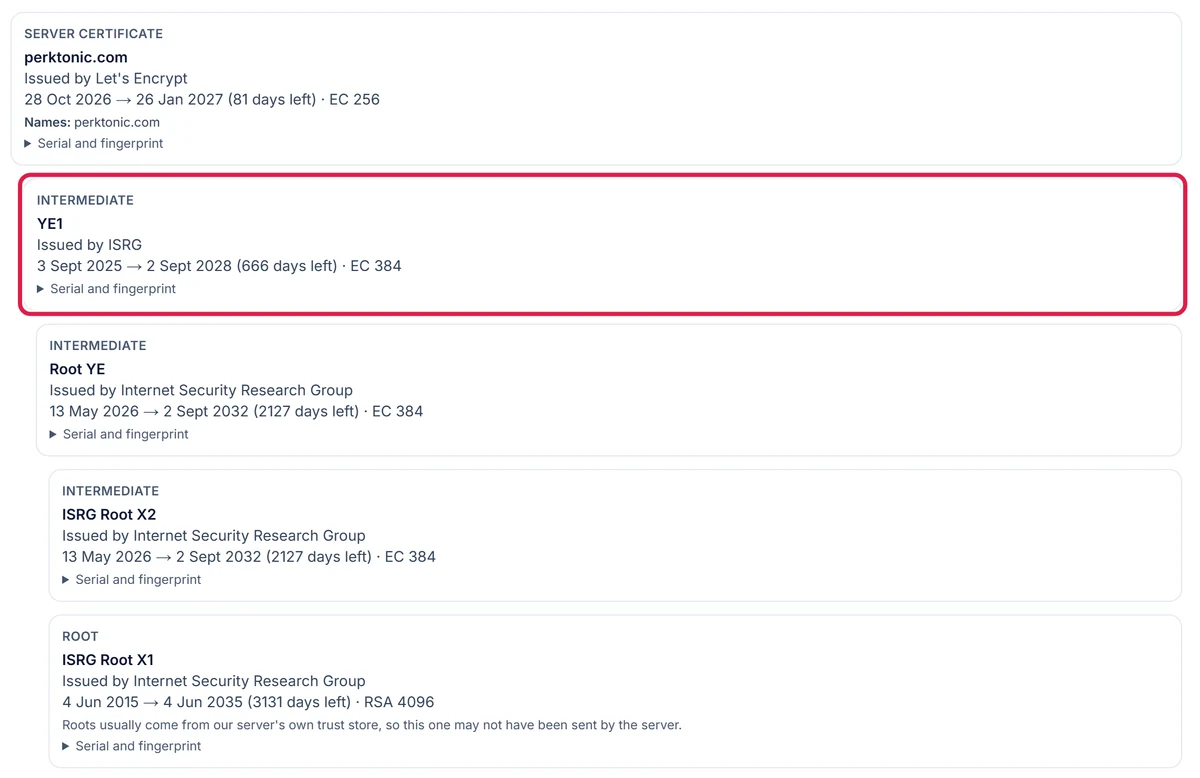
In the example of perktonic.com, the intermediate YE1 comes right after the server certificate, and it is issued by ISRG. If the intermediate is missing in the list, as for incomplete-chain.badssl.com, the server has not sent it, and that is the gap.
The root usually does not appear in what the server sends. The checker lists it at the end of the chain with the note: "Roots usually come from our server's own trust store, so this one may not have been sent by the server."

That is normal and not a fault. A server should not send the root, because the client already has it. Your concern is the intermediate.
Install the full chain
The fix is to configure the server with the full chain: the certificate followed by the intermediate certificates. Most authorities provide this as a single file. With Let's Encrypt, the file is often called fullchain.pem. It holds the certificate first and the intermediate after it. A second file, usually called cert.pem, holds only your certificate. If you configure the server with cert.pem, you send an incomplete chain.
The setting differs between servers.
- In nginx, the directive ssl_certificate should point to the full chain file.
- In Apache, the certificate file directive can point to the full chain file in current versions. Older configurations had a separate directive for the chain file.
- In a hosting panel, paste the certificate and the CA bundle or intermediate certificates into the fields provided for them.
Keep the order: your certificate first, then the intermediate. After you change the file, reload or restart the service, as a running server keeps the old file in memory.
Check again
Run the checker again. The message about the incomplete chain should be gone, and the list should show the certificate and the intermediate.
Test with the client that failed: the app, the phone or the API call. A repaired chain fixes it immediately. If it still fails, other causes are possible: a certificate for another name, which is described in Certificate Name Mismatch: www vs Bare Domain, or an expired certificate, see Check When an SSL Certificate Expires.
If you use several servers behind one name, check each of them, because one server can still send the old file.
Try it
Open the SSL Certificate Checker, enter your domain and press Check. If it says that the chain is incomplete, install the full chain file, reload the server and check again. Then test with the app or the API client that failed before.