
Add an HSTS Header and Check It Works
HSTS checker: what Strict-Transport-Security does, a strong max-age value, the preload requirements, server config for Nginx, Apache and Caddy and why HSTS over HTTP is ignored.

Even with a redirect from HTTP to HTTPS, the first request of a visitor can still travel over plain HTTP, and that first request can be intercepted. HSTS closes that gap: it tells the browser to use HTTPS only for your site. An HSTS checker reads the Strict-Transport-Security header and judges its value. The HTTP Response Header Analyzer does this and gives you the configuration to add it.
What HSTS does
HSTS stands for HTTP Strict Transport Security. A server sends the header Strict-Transport-Security over HTTPS, with a time in seconds. For that time, the browser changes every http:// request to your site into an https:// request before it sends anything, and it refuses to continue if the certificate is invalid.
The effect is that the unprotected first step disappears for returning visitors. A redirect from HTTP to HTTPS still exists for new visitors, but a browser that has seen the header never uses it again until the time runs out.
The header is described on MDN under Strict-Transport-Security, and the mechanism is specified in RFC 6797.
HSTS belongs on a site where HTTPS works everywhere. Before you add it, make the redirect a single step, as in Redirect HTTP and www to HTTPS in a Single Hop, and confirm the certificate with the SSL Certificate Checker.
A strong value and the preload requirements
The header has up to three parts:
Strict-Transport-Security: max-age=31536000; includeSubDomains; preload
- max-age is the time in seconds that the browser remembers the rule. 31536000 is one year.
- includeSubDomains applies the rule to all subdomains.
- preload signals that the site wants to be added to the list of HSTS domains that browsers ship with.
In the analyzer, github.com gets 25 out of 25 points for HSTS (checked on 6 November 2026), with the note "preload is set and the header meets the preload list requirements (max-age ≥ 1 year, includeSubDomains)". Its value is the strong form above.

A short max-age is flagged. The W3C site, www.w3.org, sends max-age=15552000 with includeSubdomains and preload. The analyzer rates it Weak, 10 out of 25, and says: "max-age is 180 days; one year (31536000) is the common recommendation." It adds that preload is set, but that the preload list also needs a max-age of at least 31536000 and includeSubDomains. A value of a few days would be weaker still, because the rule expires before many visitors return.

The requirements for the preload list, in short: a valid certificate, a redirect from HTTP to HTTPS on the same host, the header on the HTTPS answer with a max-age of at least one year, includeSubDomains and preload. Be careful with preload. Once a domain is on the list, removing it takes a long time, and every subdomain must work over HTTPS. Add preload only when you are sure.
A safe rollout: start with a short max-age, such as an hour or a day, check that nothing breaks, raise it to a week, then to a month, and then to a year.
Copy the server config
Under the grade, the block Configuration to fix it offers the lines for Nginx, Apache and Caddy, with a button that copies the configuration of the tab you picked, for example Copy Apache config. The block holds every header that is missing or weak, not only HSTS. Its HSTS line has no preload: a comment says to add '; preload' after checking that every subdomain supports HTTPS.
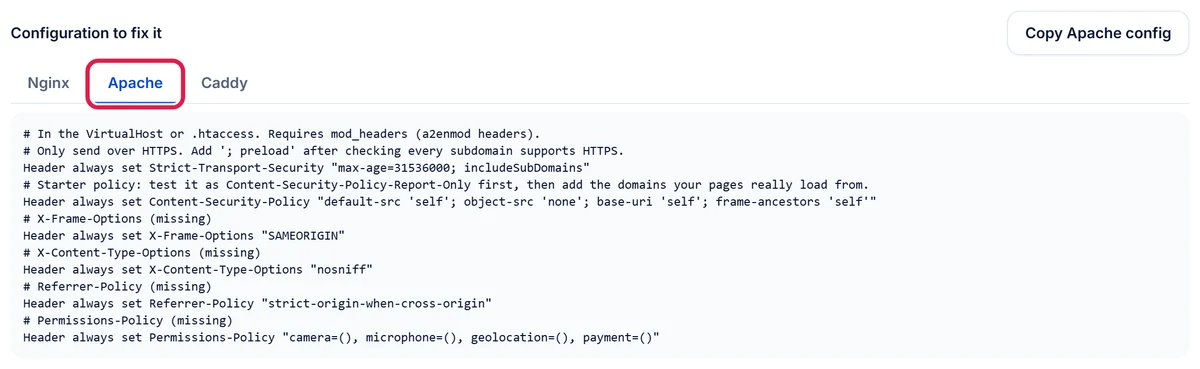
The HSTS lines look like these examples, here with preload, which you add only when you meet the requirements above:
# Nginx
add_header Strict-Transport-Security "max-age=31536000; includeSubDomains; preload" always;

# Apache
Header always set Strict-Transport-Security "max-age=31536000; includeSubDomains; preload"

# Caddy
header Strict-Transport-Security "max-age=31536000; includeSubDomains; preload"
Place the line in the HTTPS server block or virtual host, reload the server and run the analyzer again. In Nginx, the word always makes the header appear on error responses as well. In Apache, the module for headers has to be enabled.
If the header is set both in the application and in the server, you may send it twice. Browsers handle that, but keep one source so that the value is clear.
HSTS on HTTP is ignored
Browsers accept the header only when it arrives over HTTPS. A Strict-Transport-Security header on a plain HTTP response is ignored, because an attacker on the network could add or change it. This is part of the design in the specification.
For the check, this means that you must test the HTTPS address. If you enter an http:// address, the response may be a redirect, and the header of the redirect does not count. The analyzer scores HSTS only on an HTTPS answer: for http://example.com/ the HSTS row says "The page is served over plain HTTP. Browsers ignore HSTS on HTTP responses; redirect to HTTPS and send the header there." Use the final HTTPS address, which you can find with the Redirect Chain Checker.
HSTS is one of six graded headers. The whole picture is in Check Security Headers and Read the Score.
Try it
Open the HTTP Response Header Analyzer and enter your final HTTPS address. Read the HSTS score and the value of max-age, copy the configuration for your server, roll out the value in steps, and check again.