
Validate JSON Against a JSON Schema
How to validate JSON against a JSON Schema: paste the schema, read each problem with its path and keyword, pick the draft, and know the limits of the check.
JSON that is valid syntax can still be wrong for your purpose: a port number that is too large, an empty list where one entry is required, a field that should not be there. To validate JSON against a schema, paste both into the JSON Formatter & Validator. It checks the data against the schema and lists each problem with the path of the value that fails.
Paste the schema
A JSON Schema describes what a document must look like: the type of each field, limits for numbers, the minimum size of a list and which fields are allowed. The validator takes the schema in one input and the data in another.
- Open the JSON Formatter & Validator.
- Paste the data you want to check under Paste JSON.
- Scroll to Validate against a JSON Schema (optional) and paste the schema into the Schema box.
- Pick the Draft if the default does not fit. The default, From $schema, uses the draft named in the schema, or 2020-12 if there is none.
- Read the list of problems.
First check that both texts are valid JSON. A syntax error stops the validation, and Fix Invalid JSON: Unexpected Token and Missing Comma explains how to find it.
Worked example: draft-07 with three errors
Here is a schema in draft-07 for a small configuration:
{
  "$schema": "http://json-schema.org/draft-07/schema#",
  "type": "object",
  "properties": {
    "port": { "type": "integer", "maximum": 65535 },
    "hosts": { "type": "array", "minItems": 1 }
  },
  "additionalProperties": false
}
And this is the data to check:
{"port": 70000, "hosts": [], "debug": true}
The validator reports "3 problem(s) found (draft 7)" and lists them:
- $.port, keyword maximum: 70000 is greater than 65535.
- $.hosts, keyword minItems: Array has too few items (0 < 1).
- $.debug, keyword additionalProperties: Property "debug" is not allowed (additionalProperties is false).
Each problem also shows the line and the column of the value in your data.
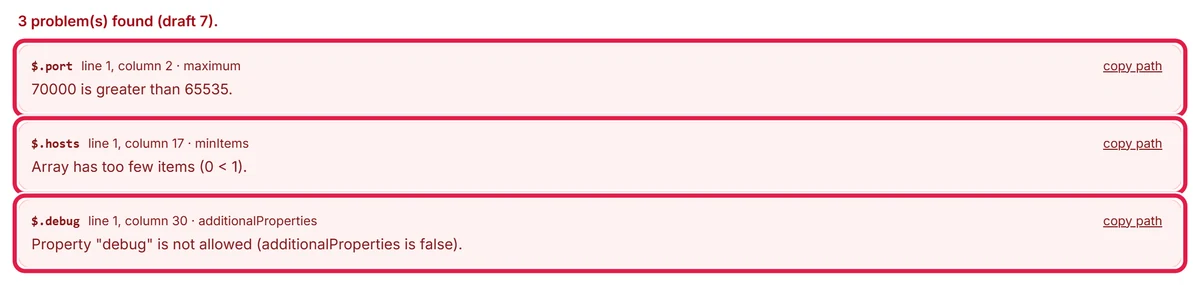
Each problem is one rule of the schema that the data breaks, and none hides another. You see all three at once and can correct them in one pass.
Read each path
Each message starts with a path, written in the form $.port, where $ is the root of the document. A value inside a list is addressed by its position, so $.items[0].sku is the sku of the first item. The path tells you where the problem is, and the text after it says which rule failed.
In the Tree tab of the result, every node has a copy path link, and arrows expand the objects and lists. This helps in a large document, where finding a field by scrolling takes a long time.

The same path form works in the JSONPath & jq Tester. Paste the data there and enter the path, and you see the value that fails the schema. JSONPath can also select every value that meets a condition, such as all items with a certain field.
Read the keyword of the rule as well as the path. A maximum, a minimum number of items and a forbidden property are three different kinds of mistakes, and they have different fixes: change the data, relax the schema, or find out why the data was produced in the wrong way.
Supported drafts
JSON Schema exists in several versions, called drafts, and they differ in details. The validator supports 2020-12, 2019-09, draft-07 and draft-04.
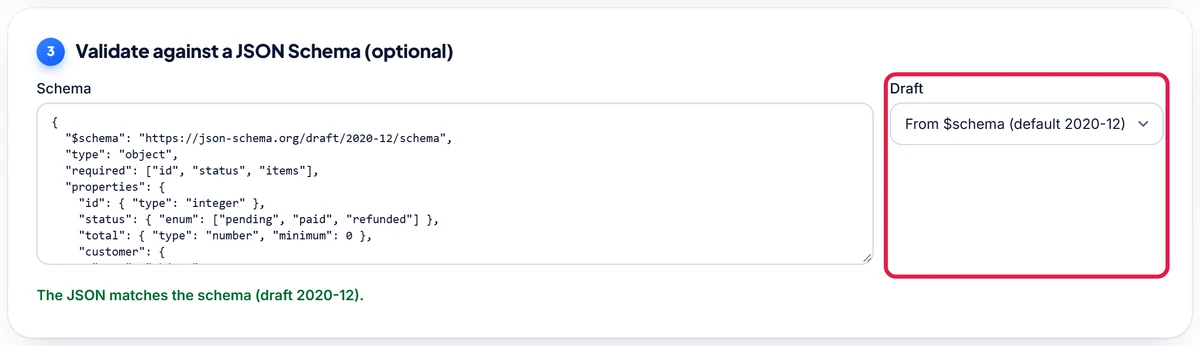
Pick the draft that your schema is written for. If the schema has a $schema line, it names the draft, as in the example above. A schema checked with the wrong draft can give wrong results, because a keyword may exist in one draft and not in another. The specification and the drafts are published at json-schema.org.
Limits
A schema can contain a pattern, which is a regular expression that a string must match. Some patterns can take a very long time on certain inputs. To protect the page, a pattern that runs longer than 2 seconds is stopped, and the validation reports that the pattern was stopped instead of hanging.
If you see that message, simplify the pattern, for example by anchoring it and avoiding nested repetitions. The size limits are the same as for the formatter: pasted text can be up to 5 MB, and files up to 50 MB.
Remember what the validator does and does not do. It checks the structure and the rules of the schema. It cannot judge whether the values are true, for example whether a host exists or a port is free.
Try it
Open the JSON Formatter & Validator, paste your data and your schema, and pick the draft. Read the path and the rule of each problem, fix them one by one, and validate again until the list is empty.