Keepa vs CamelCamelCamel vs Google: Which Tracker to Pick
Keepa vs CamelCamelCamel vs Google compared on stores covered, alerts and ease of use, with a clear pick for each type of shopper. See which fits you.
Look up the same product in three price trackers and you can come away with three slightly different stories. A different seller, a different date range, a different idea of what counts as low.
Here's how Keepa vs CamelCamelCamel vs Google's price tracking stacks up on stores covered, alerts and ease of use. I haven't run one product through all three, so there are no side-by-side results here. CamelCamelCamel's own site mostly wouldn't open for my research tools, so its entry is the thinnest. Everything below was checked on 14 October 2026.
Quick answer: Pick by where you shop. Keepa suits Amazon shoppers who want charts on the product page. CamelCamelCamel is the other Amazon option, set up by pasting a link. Google's Chrome tracking follows products across sellers, but only in five countries. I haven't tested them side by side.

Keepa vs CamelCamelCamel vs Google: how do they compare?
I compared them on four things: which stores they cover, what history they show, how alerts work and how hard setup is. The sources are each tool's own pages, not review sites.
The catch: official pages describe features, not accuracy. None of the pages I read promises that its history is complete, so treat any chart as a guide.
Keepa
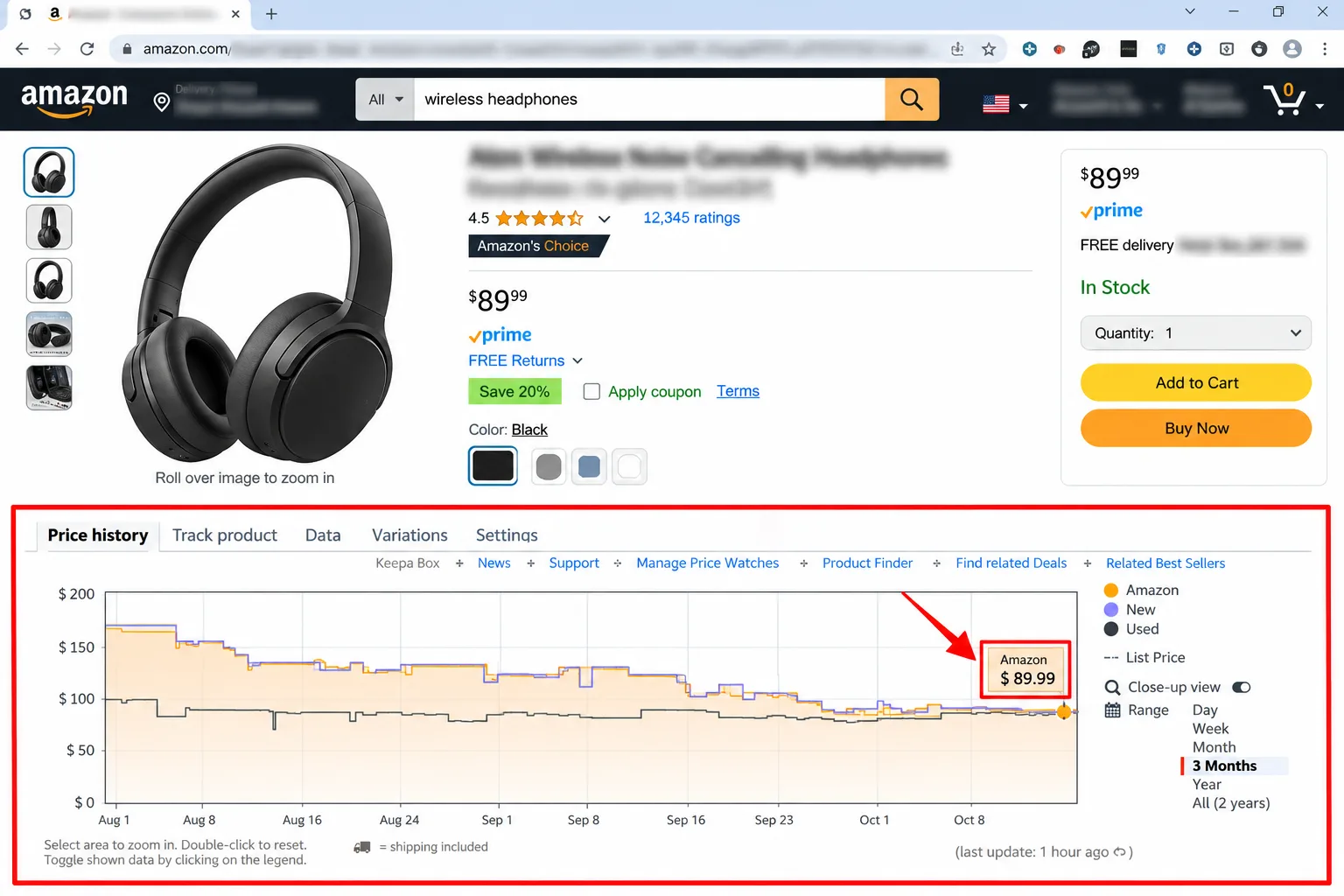
- Stores: Amazon only. Its Chrome listing names ten Amazon sites: the US, UK, Germany, Japan, France, Canada, Italy, Spain, India and Mexico.
- History: interactive price history charts on Amazon product pages. The listing doesn't say how far back they go.
- Alerts: price drop and availability alerts, including Lightning Deals.
- Ease: the listing says there's no account needed to start tracking.
The catch: the listing declares that the extension handles personally identifiable information, and it rates 3.4 out of 5 from about 5,100 ratings. It also says eBay links in its Keepa Box go through an eBay affiliate program. I couldn't confirm which features are free, though a Keepa forum thread title suggests some data features sit behind a monthly subscription. Check keepa.com before you rely on it.
CamelCamelCamel
- Stores: Amazon. A search listing describes its homepage as an Amazon US tracker, but I couldn't open the page to confirm which other Amazon sites it covers.
- History: I couldn't open its pages on charts or history length, so check camelcamelcamel.com.
- Alerts: its setup page says it will email you when the price drops. It describes no other alert types.
- Ease: copy the Amazon product URL, paste it into the site's search bar, choose the price type to watch (usually Amazon's own price) and click Start Tracking.
The catch: I could confirm only the price watch setup page, so this is the entry with the most gaps. Read its own support pages before you choose it.
Google (Search and Chrome price tracking)
- Stores: products across the web, not one retailer. Google's pages don't list which stores or products are trackable.
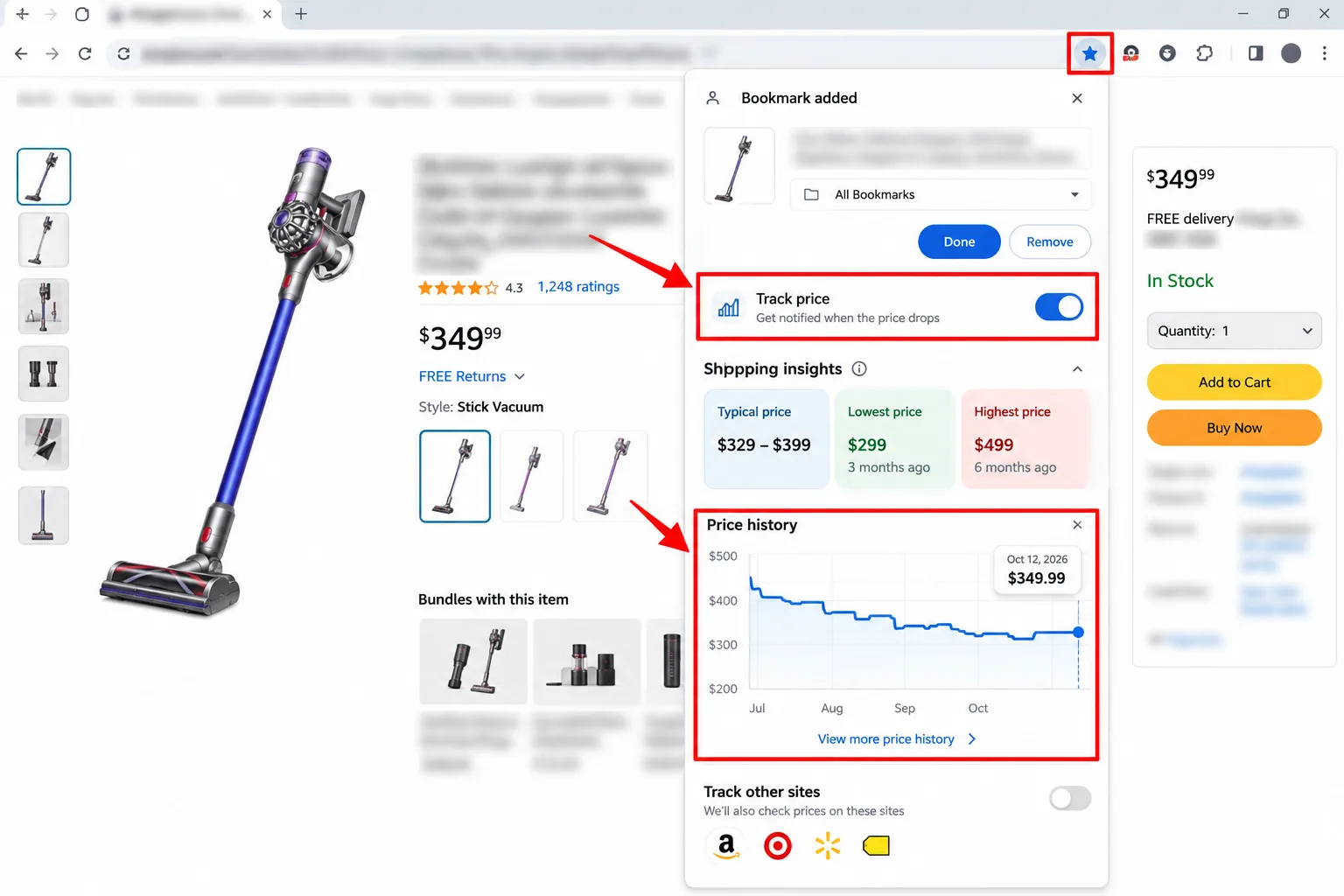
- History: Chrome's Shopping Insights shows price history and price range across the web, including variants such as colour or storage size. Google's price insights compare today's price with the past three months.
- Alerts: price-drop notifications include multiple sellers. Email alerts are optional.
- Ease: no extension, but you need Chrome, a Google account, tab and history syncing and the "Make searches and browsing better" setting. In Search, you can tap the track price icon next to a product, and Google emails you when the price falls.
The catch: Chrome's tracking is limited to people living in Australia, Canada, India, Japan or the US. Google's help page doesn't say how long history is kept or how many items you can track.
Which price tracker should you choose?
- Choose Keepa if you shop mostly on Amazon, want the chart on the product page and are happy with its data declaration.
- Choose CamelCamelCamel if you'd rather paste an Amazon link into a website than install an extension, and you'll check its support pages for the details I couldn't confirm.
- Choose Google if you buy from many stores, live in one of the five supported countries and already use Chrome signed in.
- Choose none of them if you buy a handful of things a year. A quick look at a price history checker before checkout does the job.
How do you set a price alert that works?
- Pick the exact variant: the colour, size and storage you want.
- Look at the past low on the chart, then set your target a little above it.
- Keep notifications on. An alert nobody sees is a bookmark.
- After you buy, leave the alert running for the store's refund window. Some stores will refund a later drop, as we explain in our guide to the price adjustment policy.

The catch: a tracker shows what happened, not what happens next. A price that has fallen to its lowest in a year can still fall again next week.
My take and next step
For Keepa vs CamelCamelCamel, I can only say what the pages support. My pick: Google's tracking first if you live in a supported country, because it follows many sellers without an extra extension, and Keepa on top if most of your spending goes through Amazon. Skip this if: you only want to know whether a sale is real today, in which case a one-off history check is enough.
Next step: pick one product you plan to buy, set a Google alert and a Keepa or CamelCamelCamel watch for it, and see which tool tells you first. Coupon tools are a separate decision, and our best coupon browser extensions comparison covers what each one sees. More in the Money-Saving Guides hub.
Last checked: 14 October 2026, against Keepa's Chrome Web Store listing, Google's Chrome help page and blog post, and CamelCamelCamel's price watch page. Most other CamelCamelCamel pages did not open for my research tools. Features, countries and pricing change, so confirm them on each tool's own site.
Frequently asked questions
How do I stop Google price alerts?
Open the Shopping list under Bookmarks and lists in Chrome, then untrack or delete the product. Google's help page says email alerts can be switched on or off under Settings, then Google services, and each email has an unsubscribe link.
Can I run two trackers at once?
Nothing I read forbids it. Keepa is a browser extension, while Google's tracking is a Chrome feature, so they can sit side by side. The catch is duplicate alerts, and a different price from each. Use one as your main alert and the other as a cross-check.
What can the Keepa extension access?
Its Chrome listing says permissions include access to keepa.com and Amazon sites, cookies and local storage for settings. It declares personally identifiable information and says the data isn't sold. Read the listing yourself before installing.
Quiz
Keepa vs CamelCamelCamel: Which Price Tracker Wins?
10 quick questions — think you know this one?
Test Your Knowledge →Comments (9)
- D
Dana
4 days ago
Awesome article! Thanks for sharing.
- D
Drew
4 days ago
Thanks for taking the time to write this!
- L
Lee K.
Oct 9, 2026
I appreciate the straightforward approach in this article.
- R
Riley
Oct 7, 2026
I’ll definitely be checking out more articles on Perktonic.
- M
Morgan
Oct 2, 2026
I’ll definitely recommend Perktonic to others.
- J
Jordan
Oct 2, 2026
Nice work! The information is presented really well.
- M
Morgan
Oct 2, 2026
Thanks for creating content that people can learn from.
- P
Pat
Oct 1, 2026
I learned something new today. Thanks!
- R
Robin
Sep 30, 2026
I’m glad websites like this are sharing helpful information.